

This provides an overview of the Booking Name / Tent (#39) POS Key.
Subjects ▲ ▼
About ▲ ▼
What Is Required? ▲ ▼
- Swiftpos v10+
- Ensure this POS Key is added to the appropriate Keyboard Layout using the Designer. Refer HERE for more information.
What To Consider? ▲ ▼
- If required, access to this POS Key can be restricted by the Clerk Security feature.
- If the Take Away option is selected as the Default Order Type in Touch, then we recommend a Multi Link (#999) POS Key is configured with links to this POS Key and the Order Type (#19) POS Key with the Eat In Order Type option selected.
When Is It Used? ▲ ▼
Used to assign an order/sale to a Customer/Seat Number/Table Number/Pager Number/Tent Number/etc. Commonly used in cafe/bistro style venues.
Examples ▲ ▼
Example of using Table Tents and asking the customers where they are going to be sitting.
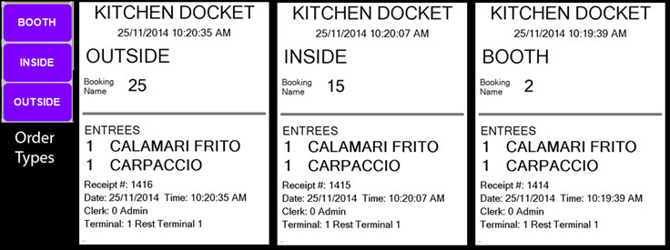
The OUTSIDE, INSIDE and BOOTH POS Keys seen on the left-hand side of the example above, are Order Type (#19) POS Keys configured with the Eat In Order Type option selected.
The 25, 15 and 2 numbers displayed opposite the Booking Name label in the Kitchen Docket examples above, are the numbers of the Table stands issued to the patron and entered into Touch using the Booking Name / Tent (#39) POS Key.
How To GET STARTED? ▲ ▼
- Review About and ensure the steps outlined HERE are addressed.
- In Keyboard Designer, select the Booking Name / Tent (#39) POS Key that has been added to a Layout.
- Ensure it is given an appropriate Caption. For example, Booking Name.
- Select the More Settings option to display the Settings screen.
- Configure the POS Key by selecting the options available HERE.
- Once configured, ensure a Full Update is sent to all the Touch terminals that will be using the POS Key. Refer HERE for more information.
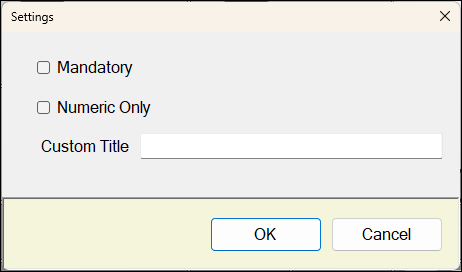
- Mandatory - Select to ensure that entry of a Booking Name / Tent # is mandatory. Selecting this option will ensure the Cancel/Esc Key is disabled.
- Numeric Only - Select to display a numeric pop-up keypad to cater for the entering of Table Tent numbers. Leave unselected (to display an alpha-numeric pop-up keypad) for the entry of Booking Names.
- Custom Title - Enter a Custom Title to be displayed at the top of the Popup Keyboard.
End of article ▲