
This outlines How To Manage Available Servings in Touch.
Subjects ▲ ▼
About ▲ ▼
What Is Required? ▲ ▼
- Swiftpos v10+
- Ensure the following POS Keys are added to the appropriate Keyboard Layout using the Designer. Refer HERE for more information.
- Ensure one or more Product POS Keys (For example, Fish of the Day) are added to the appropriate Keyboard Layout using the Designer, with the Check Available Servings option selected.
- Ensure the This Terminal is the Table Tracking Master option is selected in the Table Tracking Settings (only one Touch terminal can be flagged as the Master per Location).
- Ensure the Enable Table Tracking option is selected in the Table Tracking Settings.
- Ensure the Enable Available Servings setting is selected in the Table Tracking Settings.
What To Consider? ▲ ▼
- If required, access to the POS Keys can be restricted by the Clerk Security feature.
- Available servings are optionally reset when the Z Report is run at the end of day.
- Available servings do not work in a filtered search; it must be a POS Key on the keyboard.
When Is It Used? ▲ ▼
Used to set the number of available servings for an item/product. For example, when Fish of the Day (main meal) is limited to 25 servings, then the available servings for this item/product would be set to 25. This would then be decreased every time a main meal of Fish of the Day is sold.
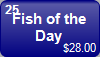
Touch operators would then be able to easily see when an item/product is about to run out. Also commonly referred to as Product countdown. It can also be used to flag out of stock items/products.
It only adjusts the quantity displayed on the item's/product's POS Key when an item/product is credited/sold.
Notes ...
It does not take an item's/product's SOH quantity into account.
How To? ▲ ▼
- Cancel An Order / Sale With An Available Servings Item / Product?
- Reset All Available Servings?
- Set An Available Servings Item / Product As Out Of Stock?
- Set The Available Servings Against An Item / Product?
- Set The Default Available Servings Against An Item/Product?
- Set Unlimited Available Servings Against An Item / Product?
End of article ▲