
-
Installers / Links / Releases
-
API
-
Back Office
-
Cloud Back Office
-
Events
-
Events Portal
-
How To
-
KVS
-
Member Portal
-
Notify
-
Oolio Pay
-
Orderaway
-
POS Keys
-
Self-Service Kiosk
-
Self-Service POS
-
Swiftpos
-
Touch
-
Touchmini
-
Troubleshooting
-
Venue Hub
-
Venue Manager
-
3rd Party Integrations
- Account Management
- Business Intelligence
- Cash Management
- eCommerce
- Exports / Imports
- Front Office Systems
- Fuel Systems
- Gaming
- General Ledger
- Gift Cards / Promotions / Vouchers
- Membership / Loyalty
- Middleware Applications
- Payment Integrators
- Product Level Blocking
- Reservations
- Swiftpos
- Tab Management
- Time & Attendance
- Value Added Services
-
Uncategorized
- API
- Back Office Accounts
- Back Office Administration
- Back Office - Clerks
- Back Office - Data Export
- Back Office - Inventory
- Back Office - Members
- Back Office - Menus
- Back Office - Products
- Back Office - Services
- Back Office - Suppliers
- Back Office - Swiftpos
- Back Office - Terminal Sales
- Back Office - Touch Settings
- Back Office - Vouchers / Discounts
- How To
- KVS
- OrderAway
- Venue Manager
- 3rd Party Integrations
- Touch
- Cloud Back Office
-
Touchmini v1 (End Of Life)
Transactions
Touchmini - Screens
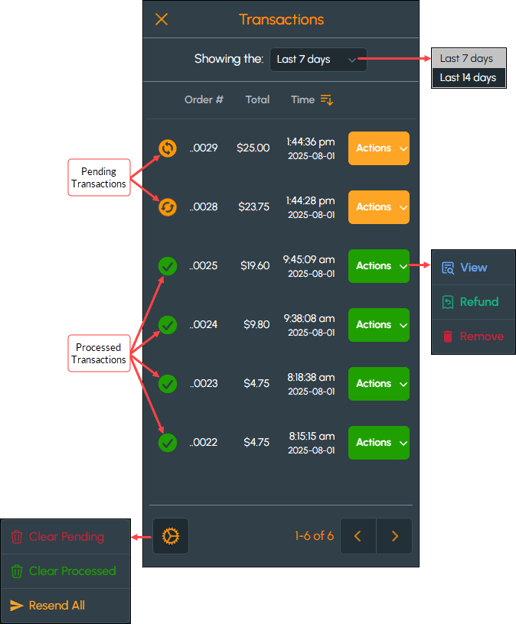
To access, select the Transactions menu option from the Touchmini Menu. Used to action/view transactions that have been transacted on the Touchmini device to date.
To exit the Transactions screen, select the X option in the top left-hand corner of the screen to exit and return to the Touchmini Menu.
Sections ▲ ▼
Header Section ▲ ▼
Select from the Showing the drop-down list one of the following:
- Last 7 days - Select to only show the transactions in the last 7 days.
- Last 14 days - Select to only show the transactions in the last 14 days.
Grid Section ▲ ▼
Displays the Order #, Total and Time of the transactions listed. Toggle select the Time column heading to toggle the order (ascending/descending) in which the transactions are listed. It also, displays the following along with each transaction:
- A status icon - The icon displayed here will either be:
 For a Pending transaction.
 For a Processed transaction.
- An Actions option - Select from the following:
- View - Select to open the Transaction screen to view the transaction. Refer HERE for more information.
- Refund - Select to refund the transaction. Refer HERE for more information.
IMPORTANT
If the Apollo (Global Pay) payment type option is configured for the Touchmini device then refunds are only permitted via the Transactions screen by selecting the Refund option when the Action option is selected opposite the transaction to be refunded. Otherwise refer HERE for more information.
If the Apollo (Global Pay) payment type option is configured for the Touchmini device then refunds are only permitted via the Transactions screen by selecting the Refund option when the Action option is selected opposite the transaction to be refunded. Otherwise refer HERE for more information.
- An Actions option continued ...
- Remove - Select to remove the transaction. Refer HERE for more information.
Footer Section ▲ ▼
- Settings Icon - Select the icon in the bottom left-hand corner of the screen to access one of the following options:
- Clear Pending - Select to clear all pending transactions. Once cleared they will no longer appear in the grid.
- Clear Processed - Select to clear all processed transactions. Once cleared they will no longer appear in the grid.
- Resend All - Select to resend all transactions that are listed in the grid.
End of article ▲