
This provides information regarding the EFT27 - PC-EFTPOS (TCP/Cloud) peripheral in Touch POS.
Refer HERE for Reseller & Support information.
Subjects ▲ ▼
About ▲ ▼
What Is Required? ▲ ▼
- Swiftpos v10.74+
What Is Supported? ▲ ▼
- Surcharging
What To Consider? ▲ ▼
- Venues must have an unexpired Software Enhancement Licence.
- If a printer is connected, then ensure an actual printer is selected. Do NOT use the <<Default Printer>> option because the device cannot see it.
When Is It Used? ▲ ▼
To be continued ...
Screens ▲ ▼
EFTPOS Settings Screen ▲ ▼
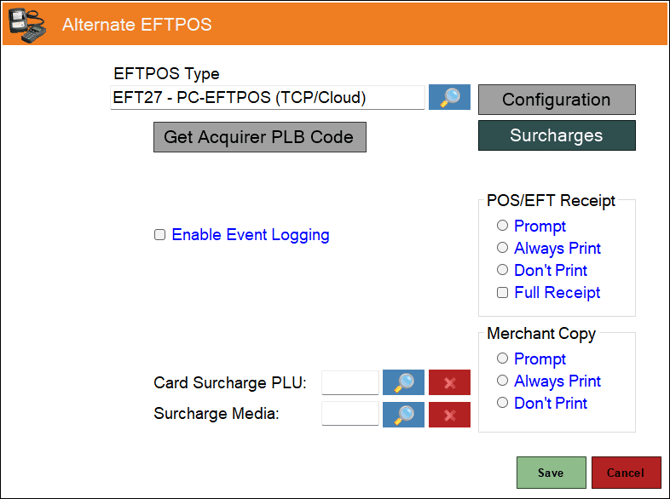
- EFTPOS Type - Select from the drop-down list the EFT27 - PC-EFTPOS (TCP/Cloud) option. Refer HERE for more information.
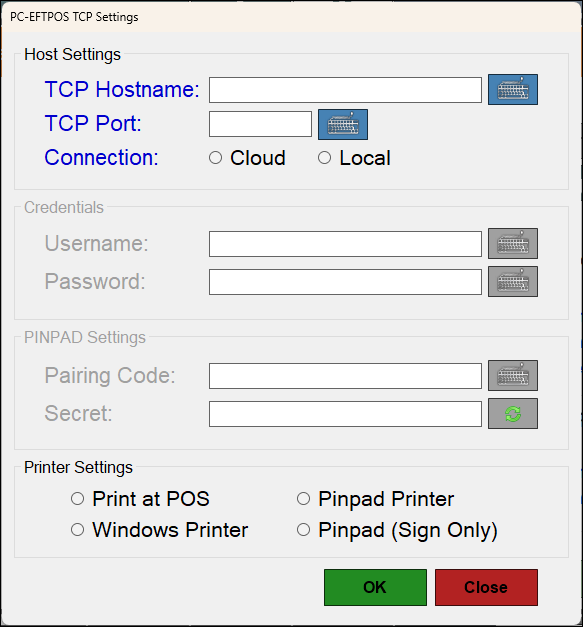
- Configuration - Select to open the PC-EFTPOS TCP Settings screen.
- Get Acquirer PLB Code - Select to ...
- Surcharges - Select to open the EFT Surcharges By Card screen.
- Enable Event Logging - Select to enable. It is recommended that this is enabled when testing or when troubleshooting an issue.
- POS/EFT Receipt - Select from one of the Print options available. Also, if a full receipt option is required, select the Full Receipt option.
- Merchant Copy - Select from one of the Print options available.
- Card Surcharge PLU - Displays/Select the PLU to be assigned to the Surcharge.
- Surcharge Media - Display/Select the Media to be assigned to the Surcharge.
PC-EFTPOS TCP Settings Screen ▲ ▼
Troubleshooting ▲ ▼
End of article ▲