
Subjects ▲ ▼
About ▲ ▼
What Is Required? ▲ ▼
- Touch will need to be installed and operational.
- Ensure the Barrel Promotion printer has been added as a peripheral to Touch. Refer HERE for more information.
What To Consider? ▲ ▼
- It is recommended that Venues with more than one Touch terminal, configure their printers in the Back Office HERE.
When Is It Used? ▲ ▼
Used to configure the printer settings for printing Barrel Draw Tickets for placing in a barrel for drawing a winner later. It is likely that it would be a shared network printer that is designed to automatically drop the tickets into the barrel for a major prize draw.
Screens ▲ ▼
Barrel Promotion printer Screen ▲ ▼
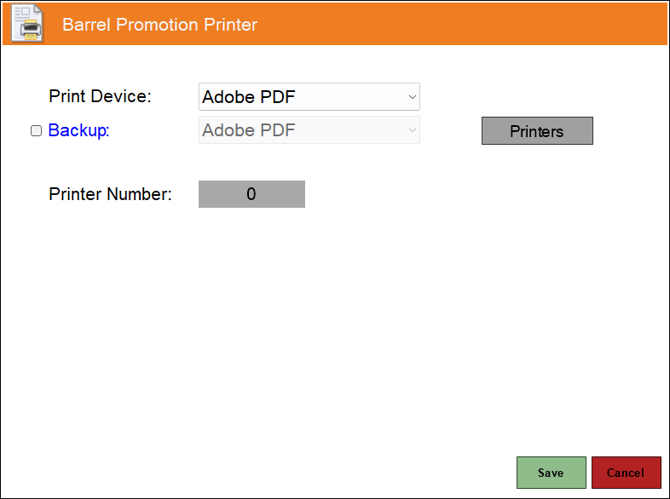
To access, select the Barrel Promotion printer option from the Peripheral Type drop-down list in the Add New Peripheral screen, and then enter an appropriate Description for the peripheral being added (For example, Barrel Promotion Printer) and select OK. The above screen will then be displayed. Used to configure/manage/view Barrel Promotion printers for Touch.
- Print Device - Select from the drop-down list the print device for printing Barrel Draw Tickets.
- Backup - Select from the drop-down list the print device to be designated as the backup print device. Refer HERE for more information.
- Printers - Select to open the Printing Devices screen to configure print devices.
- Printer Number - Displays/Enter the number identifying the print device for printing Barrel Draw Tickets.
End of article ▲