

Terms & Concepts ▲ ▼
Backup Printer ▲ ▼
Used to divert printing to an alternative printer in the event of a printer or network failure. To use the backup printer feature that is built into Touch the Epson TMU220 Windows printer driver will need to be used for this to work. The Epson TMU220 Windows printer driver is the only one that provides feedback that the printer is out of paper or offline. This has been tested to work with an ethernet printer interface and an RS232 printer interface using a correctly wired RS232 Cable. The alternative (which is recommended), is to just let the Windows print queue manage the print jobs (without using a backup printer) and when the printer comes back online, all the outstanding print tasks will print to the printer without fail. Also, be aware that setting the backup printer to another printer on the network, will be of no avail if the network drops out. Then both printers will be offline and print jobs will fail. Refer HERE to view the status of printers.
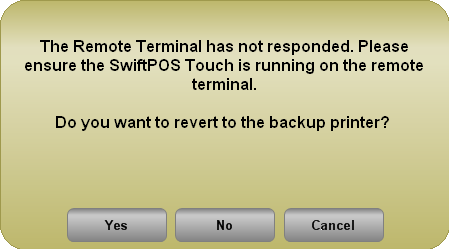
Example of the prompt that is displayed when a printer goes offline or runs out of paper. Select Yes to revert to the Backup Printer. Once confirmed this will remain the case until Touch is restarted or the Touch settings is entered and exited.
Notes ...
Do NOT use with Wireless POS Terminals.
Bistro Tables ▲ ▼
A Bistro Table is similar to a Table with the exception that, items added to a Bistro Table (usually by patrons) are required to be paid for immediately or finalised to a TAB. After each order is completed, a prompt will be displayed, requesting confirmation as to whether this is the last order for the Bistro Table. If confirmed with a Yes response, the order will be sent to the Kitchen. Bistro Tables can be added to an order/sale using anyone of the following modes:-
Bistro Table First Mode - Generally refers to when a Bistro Table is added at the start of an order. That is, the Bistro Table number is entered, and the Table (#30) POS Key (configured for a Bistro Table) is selected at the very beginning of the order and then all the items/products are added.
-
Bistro Table Last Mode - Generally refers to when a Bistro Table is added at the end of an order. That is, all items/products are added, and the Bistro Table number is entered, and the Table (#30) POS Key (configured for a Bistro Table) is selected at the very end the order.
Notes ...
If charging to Bistro Tables from multiple Touch terminals at the same time, then ensure Bistro Table Last Mode is used.
Graphical/Non-Graphical Printing ▲ ▼
- Graphical Printing - Widely used when printing on standard printers. Headers/Footers can be configured visually by selecting font sizes and including graphics which can be updated very easily at any time. Refer HERE for more information.
-
Non Graphical (Esc/POS Printing) - The oldest and most common method, ESC/POS printing method makes use of a series of Esc codes to instruct the printer. It also requires logos to be loaded into the VRAM in each printer. The logo will be retrieved each time it needs to be printed. Refer HERE for more information.
TABs ▲ ▼
Like a Table, TABs also allow items to be added to a TAB without having to pay for the items straight away. TABs are visible in all Locations that have Table Tracking enabled, as opposed to Tables which are only visible in a specific Location. Another difference between a Table and a Tab is that any number of Tables can be linked to a TAB, allowing for the TAB to be finalised and rather than the individual Tables. Refer to Differences Between Tables And TABs for more information. TABs can be added to an order/sale using anyone of the following modes:
-
TAB First Mode - Generally refers to when a TAB is added at the start of an order. That is, the TAB number is entered, and the Table (#30) POS Key (configured for a TAB) is selected at the very beginning of the order and then all the items/products are added.
-
TAB Last Mode - Generally refers to when a TAB is added at the end of an order. That is, all items/products are added, and the TAB number is entered, and the Table (#30) POS Key (configured for a TAB) is selected at the very end the order.
Tables ▲ ▼
TABLES - A Table allows items to be added without having to pay for the items immediately. Instead, Table bill is finalised at the end of the meal. Tables support the setting of covers, assigning items to individual seats and linking Tables to Accounts, as well as setting credit limits if required. Tables can be added to an order/sale using anyone of the following modes:
-
Table First Mode - Generally refers to when a Table is added at the start of an order. That is, the Table number is entered, and the Table (#30) POS Key is selected at the very beginning of the order and then all the items/products are added.
-
Table Last Mode - Generally refers to when a Table is added at the end of an order. That is, all items/products are added, and the Table number is entered, and the Table (#30) POS Key is selected at the very end the order.
End of article ▲