
This provides an overview of the Account Payment (#200) POS Key used in Touch to make payments/top-ups to a Customer's/Member's Account. To make live payments/top-ups refer HERE.
Subjects ▲ ▼
About ▲ ▼
What Is Required? ▲ ▼
- Swiftpos v10+
- Ensure this POS Key is added to the appropriate Keyboard Layout using the Designer. Refer HERE for more information.
What To Consider? ▲ ▼
- If required, access to this POS Key can be restricted by the Clerk Security feature.
- The amount paid into an Account will only increase the Account's balance when the payment is processed in the Back Office. That is, when there is a connection to Back Office. For live payments/top-ups refer HERE.
- At any time, an Account Summary can be printed to view amounts owing.
- To auto allocate payments, refer to HERE.
When Is It Used? ▲ ▼
This can be used to make Payments to or Top Up an Account in Touch. Refer HERE for more information.
How To GET STARTED? ▲ ▼
- Review About and ensure the steps outlined HERE are addressed.
- In Keyboard Designer, select the Account Payment (#200) POS Key that has been added to a Layout.
- Ensure it is given an appropriate Caption. For example, Account Payment/Top Up.
- Select the More Settings option to display the Settings screen.
- Configure the POS Key by selecting the options available HERE.
- Once configured, ensure a Full Update is sent to all the Touch terminals that will be using the POS Key. Refer HERE for more information.
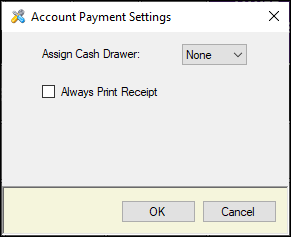
- Assign Cash Drawer - Select from the drop-down list the Cash Drawer to which the POS Key will be assigned to.
- Always Print Receipt - Select to ensure a Receipt is always printed.
End of article ▲