
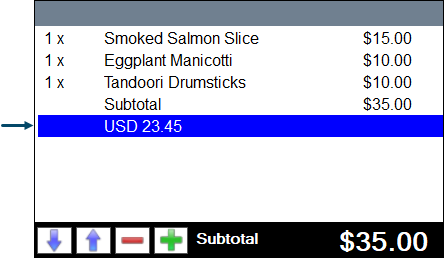
This outlines How To Display The Subtotal In An Alternate Currency in Touch using the Subtotal (#300) POS Key.
Subjects ▲ ▼
About ▲ ▼
When Is It Used? ▲ ▼
When there is a requirement to display the whole value of an order/sale in an alternate currency.
How To? ▲ ▼
Configure? ▲ ▼
- Review About and ensure the steps outlined HERE are addressed.
- In the Media tab of the Back Office > Price Level & Media Set-up, select an unused Media and configure it for the alternate currency, by giving it a name that represents the currency. For example, USD.
- Ensure it’s Foreign Currency option is selected.
- And the Currency Rate setting has the correct exchange rate. For example:

- Ensure the Show Subtotal In Alternate Currency option is selected for the Subtotal (#300) POS Key.
- Ensure the Media configured above is selected in the Media drop-down list.
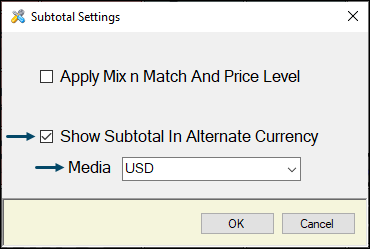
- Ensure a Full Update is sent to all the Touch terminals that will be using the POS Key. Refer HERE for more information.
Display The Subtotal In An Alternate Currency? ▲ ▼
Once configured, so as follows:
- In Touch:
- Add multiple items/products to an order/sale.
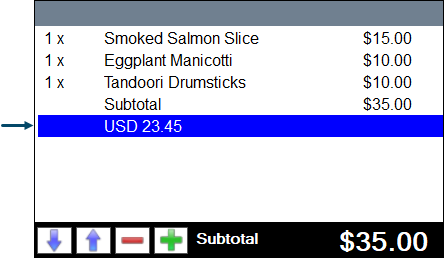
- Select the Subtotal (#300) POS Key. A Subtotal line will appear in the sales grid along with the alternate currency total below. For example:
End of article ▲