
Screens ▲ ▼
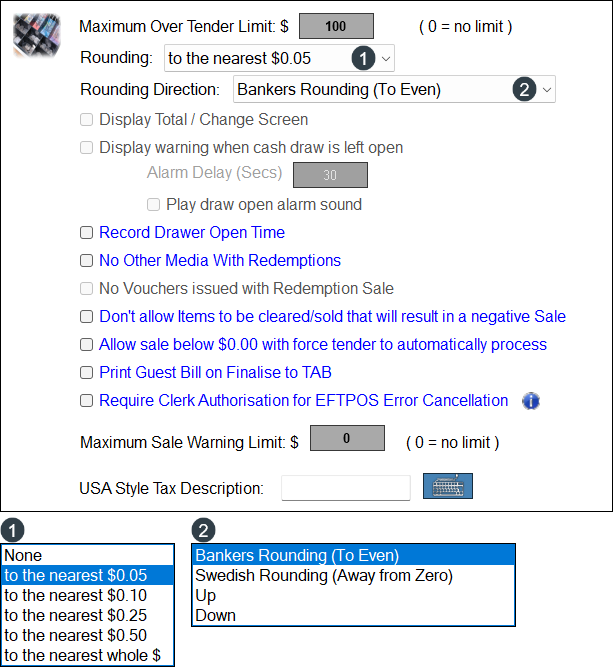
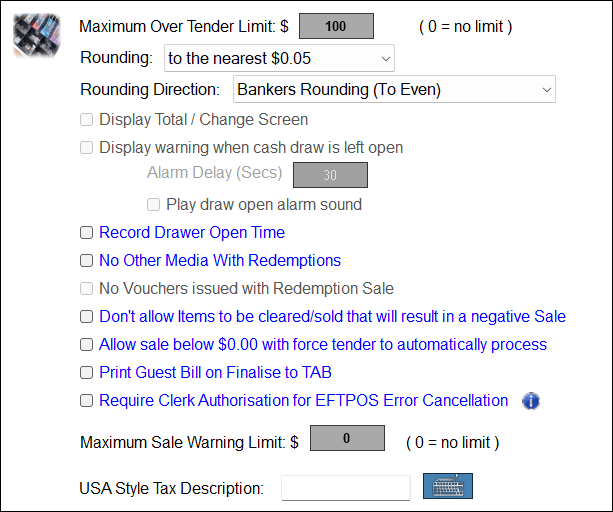
To access, select the Tenders menu option in Device Settings. Used to configure settings when tendering payments in Touch POS.
- Maximum Over Tender Limit $ - Select to display a numeric keypad to set the maximum limit. Set to zero to specify no limit.
- Rounding - Select from the drop-down list.
- Rounding Direction - Select from the drop-down list.
| Examples Of Rounding To The Nearest $0.05 |
||||
| Value | Bankers Rounding | Swedish Rounding | Up | Down |
| $1.01 | $1.00 | $1.00 | $1.05 | $1.00 |
| $1.02 | $1.00 | $1.00 | $1.05 | $1.00 |
| $1.03 | $1.05 | $1.05 | $1.05 | $1.00 |
| $1.04 | $1.05 | $1.05 | $1.05 | $1.00 |
| $1.05 | $1.05 | $1.05 | $1.05 | $1.05 |
| $1.06 | $1.05 | $1.05 | $1.10 | $1.05 |
| $1.07 | $1.05 | $1.05 | $1.10 | $1.05 |
| $1.08 | $1.10 | $1.10 | $1.10 | $1.05 |
| $1.09 | $1.10 | $1.10 | $1.10 | $1.05 |
| Examples Of Rounding To The Nearest $0.10 |
||||
| Value | Bankers Rounding | Swedish Rounding | Up | Down |
| $1.05 | $1.00 | $1.10 | $1.10 | $1.00 |
| $1.15 | $1.20 | $1.20 | $1.20 | $1.10 |
| $1.25 | $1.20 | $1.30 | $1.30 | $1.20 |
| $1.35 | $1.40 | $1.40 | $1.40 | $1.30 |
| $1.45 | $1.40 | $1.50 | $1.50 | $1.40 |
| $1.55 | $1.60 | $1.60 | $1.60 | $1.50 |
| $1.65 | $1.60 | $1.70 | $1.70 | $1.60 |
| $1.75 | $1.80 | $1.80 | $1.80 | $1.70 |
| $1.85 | $1.80 | $1.90 | $1.90 | $1.80 |
| $1.95 | $2.00 | $2.00 | $2.00 | $1.90 |
-
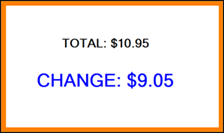
Display Total / Change Screen - Select to ensure a popup screen in Touch POS is displayed when an order/sale is completed to show the total sale amount and change to be returned to the patron. For example:
Notes ...
The above popup is not displayed when either the Fast Clerks or Log Off when Sale Finalises options are selected.
- Display Total / Change Screen continued ...
- Display warning when Cash Drawer is left open - Select to display an alarm warning and set a delay in seconds before the warning.
- Play draw open alarm sound - Select to sound an alarm when the above warning is activated.
- Display warning when Cash Drawer is left open - Select to display an alarm warning and set a delay in seconds before the warning.
- Record Drawer Open Time - Select to ensure that each time cash drawers are opened, that event is recorded.
- No Other Media with Redemptions - Select to ensure that when patrons are redeeming previously earned rewards, they cannot split payment of the order/sale across multiple Media. This prevents the occurrence of, for example, redemptions being processed and then insufficient Credit Card funds being encountered to complete the order/sale.
- No Vouchers issued with Redemption Sale - Select to ensure Vouchers cannot be issued when Customers/Members are redeeming previously earned rewards. Prevents double dipping.
- Don't allow clearing of items to take the sale below $0 - When selected, the crediting of items/products in an order/sale ensures the value of the order/sale cannot drop below zero. This will only be enforced when the Finalise POS Key used to complete the order/sale has the Allow Over Tender option selected.
Notes ...
It is recommended that this option be selected when the Reverse Qty at POS option against items/products currently being ordered/sold is in use.
- Allow sale below $0.00 with force tender to automatically process - Select to ensure an order/sale with a value below zero will be able to be completed without prompting for the tendered amount. This is used mainly for cash payouts like lottery ticket winnings in News Agencies.
- Print Guest Bill on Finalise to TAB - Select to ensure a Guest Bill is printed whenever the Finalise to Tab (#45) POS Key is selected.
- Require Clerk Authorisation for EFTPOS Error Cancellation - Select to ensure staff are required to be authorised when the Cancel or Abort options are selected on an EFTPOS device Key. Staff authorisation will be prompted when a staff member has not been granted authorisation. Authorisation is granted by selecting the Override EFTPOS Cancellation Lockout option to be selected in the Misc option of the Clerk Security Items.
Notes ...
This option will require the Override EFTPOS Cancellation Lockout option to be selected in the Clerk Security Groups. This option only applies to the EFT45 - Apollo peripheral.
- Maximum Sale Warning Limit $x - Select to ensure staff are alerted when the value of an order/sale exceeds the limit value set. Zero means no limit.
- USA Style Tax Description - Enter/Select the keyboard icon to display a touch keyboard to enter an appropriate description.
End of article ▲