
 |
 |
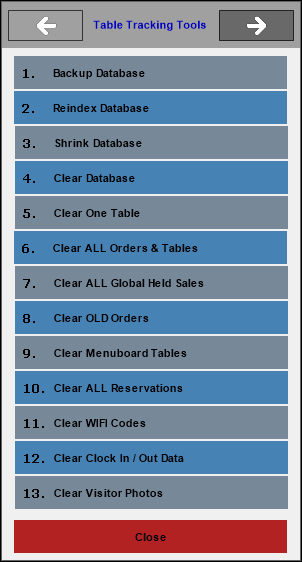
To access, select the Tools option in Touch. Used to access a number of maintenance tasks that can be performed on the Table Tracking database.
Notes ...
Ensure a backup of the Table Tracking database has been done before selecting anyone of the following menu items.
- Backup Database - Select to perform a backup of the Table Tracking database. Please note that regular backups of ALL databases should be carried out as a scheduled task.
- Reindex Database - Select to reindex the Table Tracking database. This can improve access speed in certain circumstances.
- Shrink Database - Select to shrink the database.
- Clear Database - Select to clear the entire Table Tracking database (excluding Table maps). This should be done in the following circumstances:
- On any new site prior to going live.
- If the Software Upgrade instructions advise it.
- Clear One Table - Select to clear a single Table by entering the Table Number. Generally, only used in an emergency.
- Clear ALL Orders & Tables - Select to clear all web orders and Tables from the Table Tracking.
Notes ...
Do not use this feature on a live site!
- Clear ALL Global Held Sales - Select to clear all of the held sales stored in the Table Tracking database.
Notes ...
Do not use this feature on a live site!
- Clear OLD Orders - Select to clear out old phone/web orders.
- Clear Menuboard Tables - Select to clear any schedules or Menu Board designs to ensure the update from the Swiftpos Back Office current.
- Clear ALL Reservations - Select to clear all reservations in the Table Tracking database.
Notes ...
Do not use this feature on a live site!
- Clear WIFI Codes - Select to clear the Vending Table if required.
- Clear Clock In / Out Data - Select to clear all of the held sales stored in the Table Tracking database.
- Clear Visitor Photos - Select to clear all of the held sales stored in the Table Tracking database
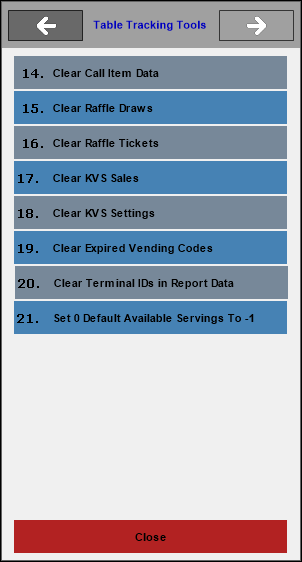
- Clear Call Item Data - Select to clear all the Call Item data in the Table Tracking database.
- Clear Raffle Data - Select to clear all the Raffle data stored in the Table Tracking database.
- Clear Raffle Tickets - Select to clear all the Raffle Tickets stored in the Table Tracking database.
- Clear KVS Sales - Select to clear all the KVS Sales data stored in the Table Tracking database.
- Clear KVS Settings - Select to clear all the KVS Settings data stored in the Table Tracking database.
- Clear Expired Vending Codes - Select to clear all Vending Codes that have been used and have expired for more than 30 days.
- Clear Terminal IDs in Report Data - Select to clear all Terminal IDs in Report Data. This will ensure that any old and obsolete POS terminals previously reported on in X and Z reporting will no longer be included as part of these reports.
- Set 0 Default Available Servings To -1 - Select to ensure the default value for Available Servings that have NOT BEEN set is reset to -1.
End of article ▲