
Screens ▲ ▼
Customer Search Screen ▲ ▼
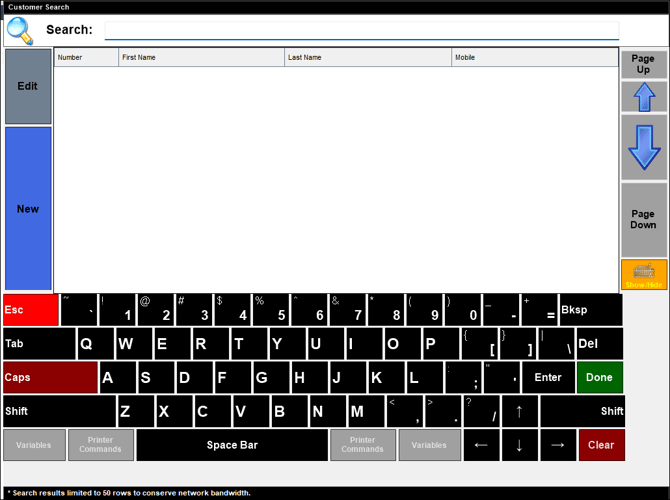
Accessed in Touch from various screens. Used to search for and select a Customer/Member.
Sections ▲ ▼
Search Section ▲ ▼

Enter the full/partial name of an existing Customer/Member to search for and locate.
Grid Section ▲ ▼
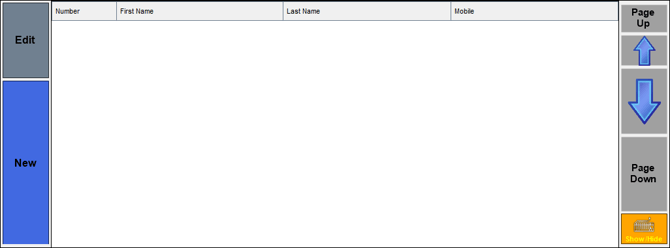
- Edit - Select to select the Customer/Member currently highlighted in the grid.
- New - Select to open the Order Customer screen to add a new Customer/Member.
Notes ...
To display the New option when it is not displayed, ensure the Disable New Customer Button from Customer Search Screen option is NOT selected.
- Grid - Select the Done option in the Keyboard section to populate the grid with a list of Customers/Members that are currently available along with their Number, First Name, Last Name and Mobile number. Refer HERE to configure the details displayed in the grid.
- Page Up/Up/Down/Page Down - Select to navigate up and down through the list to locate the Customer/Member required.
-
Keyboard Show/Hide - Toggle select to show/hide the Keyboard section.
End of article ▲