
This provides an overview of the Label Mode (#561) POS Key used in Touch.
Subjects ▲ ▼
About ▲ ▼
What Is Required? ▲ ▼
- Swiftpos v10+
- Ensure this POS Key is added to the appropriate Keyboard Layout using the Designer. Refer HERE for more information.
- Ensure a Label Printer has been configured as a Peripheral at the Swiftpos Touch terminal.
What To Consider? ▲ ▼
- If required, access to this POS Key can be restricted by the Clerk Security feature.
When Is It Used? ▲ ▼
Used to print item/product Labels. When selected, this POS Key changes the background colour of the sales grid to green, to alert Clerks/Staff that they are in Label printing mode. For example, to print labels for weighed fruit and vegetables
How To? ▲ ▼
How To GET STARTED? ▲ ▼
- Review About and ensure the steps outlined HERE are addressed.
- In Keyboard Designer, select the Label Mode (#561) POS Key that has been added to a Layout.
- Ensure it is given an appropriate Caption. For example, Print Label.
- Select the More Settings option to display the Settings screen.
- Once configured, ensure a Full Update is sent to all the Touch terminals that will be using the POS Key. Refer HERE for more information.
Screens ▲ ▼
Settings Screen ▲ ▼
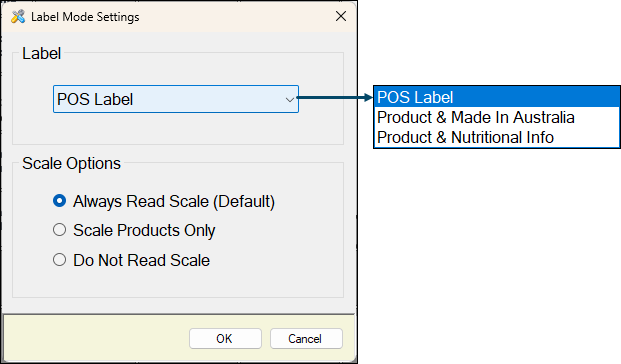
- Label - Select from the drop-down list one of the following:
- POS Label - This option does require a Label Printer to be configured and a Label designed in Touch.
- Product & Made In Australia - Select to select one of the item/product Labels listed that have been created and designed using the Product Label Designer.
- Product & Nutritional Info - Select to select one of the item/product Labels listed that have been created and designed using the Product Label Designer.
- Scale Options - Select one of the following:
- Always Read Scale (Default) - Select to ensure the weight of the item/product is always retrieved regardless of whether it is a weighted item/product or not.
- Scale Products Only - Select to ensure the weight of the item/product is retrieved ONLY when it is a weighted item/product.
- Do Not Read Scale - Select to ensure the weight of the item/product is NOT retrieved.
End of article ▲