
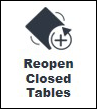
This provides an overview of the Reopen Closed Table (#114) POS Key.
Subjects ▼
About ▲ ▼
What Is Required? ▲ ▼
- Swiftpos v10+
- Ensure this POS Key is added to the appropriate Keyboard Layout using the Designer. Refer HERE for more information.
What To Consider? ▲ ▼
- If required, access to this POS Key can be restricted by the Clerk Security feature.
- When a 3rd party reservations system is in use (for example, Sevenrooms), this POS Key will only allow Tables to be re-opened that are in use by the 3rd party reservation system.
When Is it Used? ▲ ▼
Used to bring all sale items/products back that are associated with a Table transaction that has been closed (finalised) to a media (other than a Media assigned to an Integrated EFTPOS Card) and has not as yet been processed by the Z Report.
How To? ▲ ▼
How To GET STARTED? ▲ ▼
- Review About and ensure the steps outlined HERE are addressed.
- In Keyboard Designer, ensure the Reopen Closed Table (#114) POS Key is added to a Layout.
- Ensure it is given an appropriate Caption. For example, Reopen Closed Table.
- Once configured, ensure a Full Update is sent to all the Touch terminals that will be using the POS Key. Refer HERE for more information.
End of article ▲