

This outlines How To Split A Table Bill in Touchmini.
Subjects ▲ ▼
About ▲ ▼
What Is Not Supported? ▲ ▼
In phase 1:
- Splitting a Table bill based on items/products.
- The Tender Calculator For Change option.
- Adding a tip (Freedom Pay & Global Pay). A tip cannot be added in Touchmini before sending the sale to the payment app. Tipping is only supported within the payment app.
What Is Required? ▲ ▼
- Touchmini v3.1.9
-
Ensure Table service is selected in the Service tab.
-
Ensure the Enable Split Bill option is selected.
-
Ensure Cash Payment, Integrated Payment, Member Account Charge and Points Charge/Redemption options are configured for the device HERE.
What Is Supported? ▲ ▼
In phase 1:
- Splitting a Table bill based on the number of patrons Split evenly.
- Splitting a Table bill based on a fixed dollar ($) amount.
- Splitting a Table bill based on a percentage (%) of the total amount.
- Receipts can be printed for each payment made.
- Supports Account Charge, Card, Cash and Points Pay payments.
- Tipping as follows:
- The patron adds a tip in the payment app. For example, a pinpad device or payment app UI).
- The amount paid (including the tip) is returned to Touchmini after payment.
What To Consider? ▲ ▼
- For patrons, that want to pay in cash, then the amount of change to be returned to the patron, will need to be calculated.
- If patrons want to pay by items/products ordered, then add up the items/products and pay by amounts. Refer HERE for more information.
- If patrons want to tip, then add the tip amount when prompted by the payment app.
When Is It Used? ▲ ▼
Used to split Table bills by patron numbers, a fixed dollar amount ($) or a percentage (%), by taking partial payments until the full Table bill is paid.
How To? ▲ ▼
- Split A Table Bill By Patron Numbers?
- Split A Table Bill By Amounts?
- Split A Table Bill By Percentages?
- Use Quick Pay To Partially Pay A Table Bill?
How To Split A Table Bill By Patron Numbers? ▲ ▼
-
Select and open the Table to be split.
-
Select the Pay option in the checkout screen.
-
Select the Split Bill option.
-
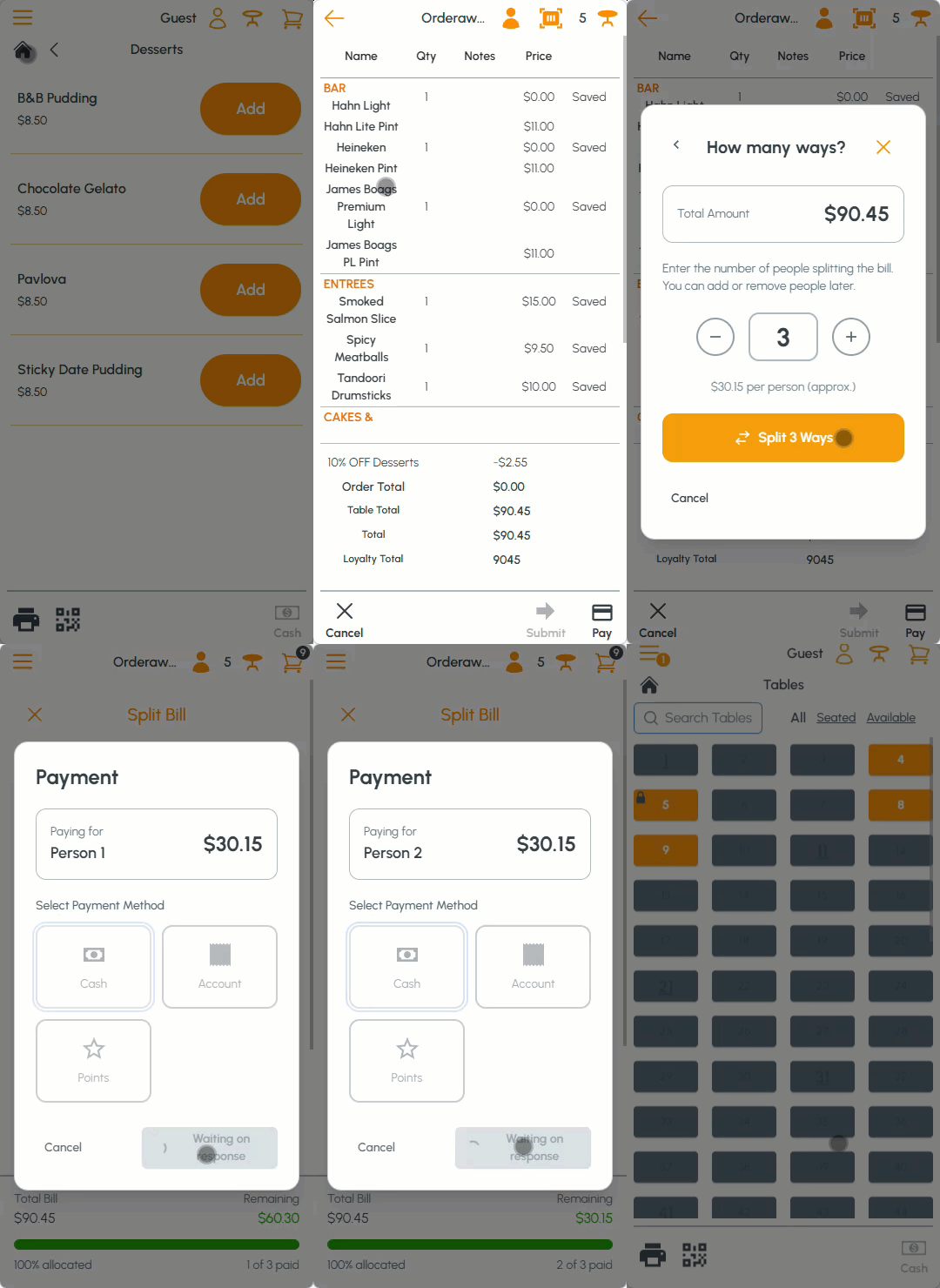
At the How many ways? prompt, enter the number (X) of patrons splitting the bill.
- Select the Split (X) Ways option.
- Payment Steps:
- In the Split Bill screen select the card icon opposite the amount owing for Person 1.
- In the Payment screen select one of the payment options available. For example, Cash.
- Repeat the above payment steps for each of the remaining patrons until the remaining balance is zero.
How To Split A Table Bill By Amounts? ▲ ▼
-
Select and open the Table to be split.
-
Select the Pay option in the checkout screen.
-
Select the Split Bill option.
-
At the How many ways? prompt, enter the number (X) of patrons splitting the bill.
-
Select the Split (X) Ways option.
-
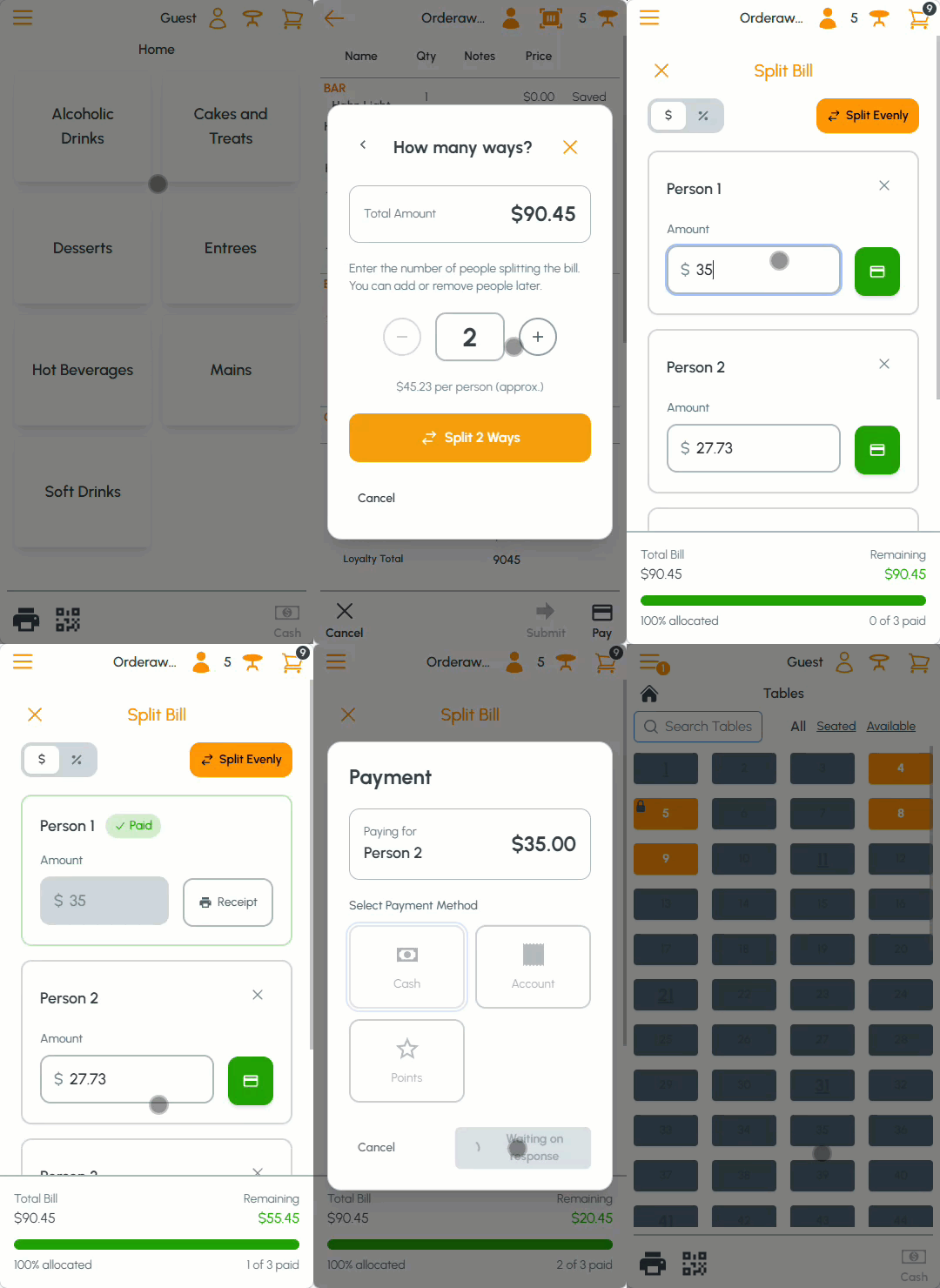
In the Split Bill screen ensure the $ option is selected.
- Payment Steps:
- In the Split Bill screen enter the amount to be paid by Person 1.
- Select the card icon opposite the amount entered.
- In the Payment screen select one of the payment options available. For example, Cash.
- Repeat the above payment steps for each of the remaining patrons until the remaining balance is zero.
How To Split A Table Bill By Percentages? ▲ ▼
-
Select and open the Table to be split.
-
Select the Pay option in the checkout screen.
-
Select the Split Bill option.
-
At the How many ways? prompt, enter the number (X) of patrons splitting the bill.
-
Select the Split (X) Ways option.
-
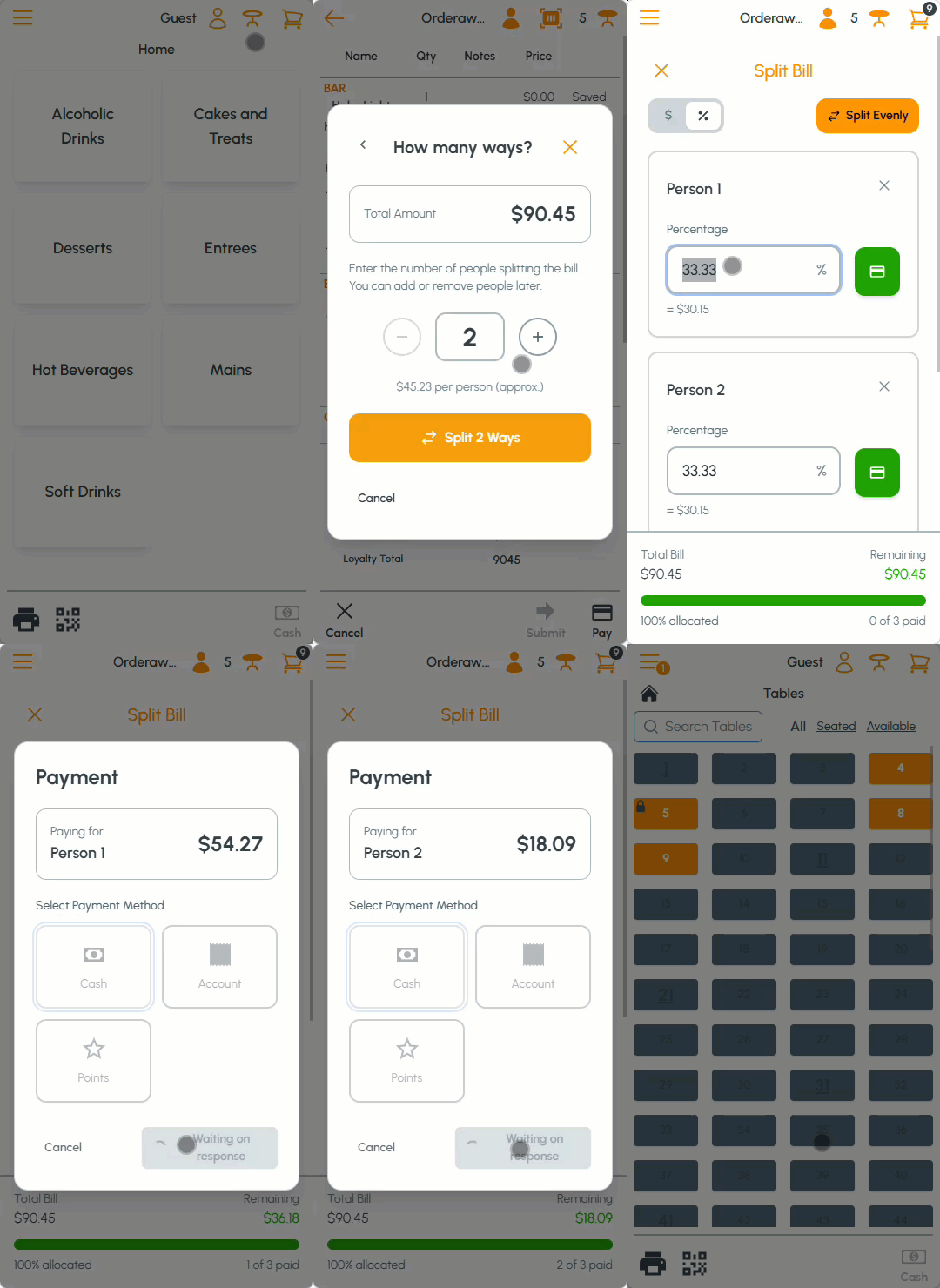
In the Split Bill screen ensure the % option is selected.
- Payment Steps:
- In the Split Bill screen enter the percentage to be paid by Person 1.
- Select the card icon opposite the percentage entered.
- In the Payment screen select one of the payment options available. For example, Cash.
- Repeat the above payment steps for each of the remaining patrons until the remaining balance is zero.
End of article ▲