
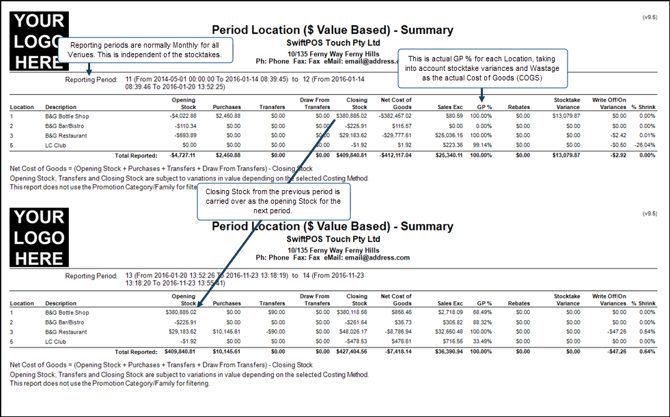
The recording of the Opening Stock for a period, is independent of any stocktaking and is basically a snapshot taken of the previous' periods (month) stock balances/levels (SOH) at the close of the period and used to create the opening stock balances/levels (SOH) for the next trading period (month).
For example, if the current trading period is May and it has come to it's completion, then prior to the start of the next trading period, June, before the start of trade (for example, before 6am on the 1st of June) run the Period Location Summary (INV018) report to view the Closing stock figures for May. Once the Period Opening Stock has been recorded, these Closing stock figures will become the Opening stock balances/levels for June.
Notes ...
Be sure to exit the Reports menu in Back Office after the first time you run the Record Period Opening Stock, to ensure the menu is refreshed. Also, recording the Opening Stock for a period will result in all Locations being unlocked and any held stock being released.
How To? ▲ ▼
To record an opening stock for a period, as an example, the month of MAY is going to be considered the previous period, and the month of JUNE is to be considered the next period. Do as follows:
- Post all outstanding Supplier Invoices and stock movements (for example, Adjustments, Batch Transfers and Transfers) associated the period MAY. Ensure all are posted with a date/time that falls within the month of MAY.
Notes ...
The ability to post into a closed period is controlled in Global Preferences HERE. Posting into a closed period is not recommended and should be avoided.
- Run the Period Location Summary (INV018) report to view the Opening and Closing stock balances/levels for the period MAY.
- Select the Record Period Opening Stock option in the footer section of the Stocktake & Period End screen.
- This will display either one of the following prompts:
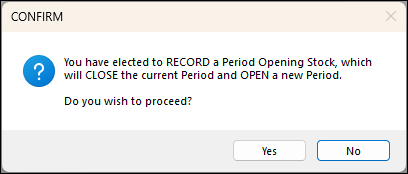 |
|
Displays when there are NO LOCATIONS currently locked as a result of a stocktake. Select the Yes option to proceed. |
|
OR
|
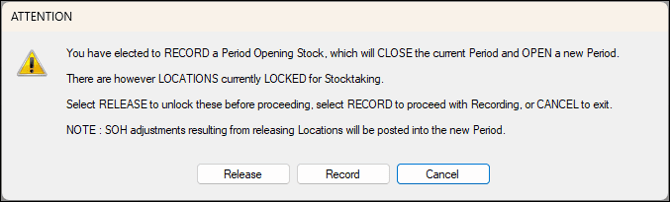 |
|
Displays when there are LOCATIONS currently locked as a result of a stocktake and listed in the grid of the Stocktake & Period End screen. Select the Release option to unlock any locked Locations and release any held stock. This is the recommended option to select once all stocktakes have been completed. Once selected the following prompt will be displayed, allowing for the selection of which Locations will be unlocked (released).
Select the required Locations and select OK. |
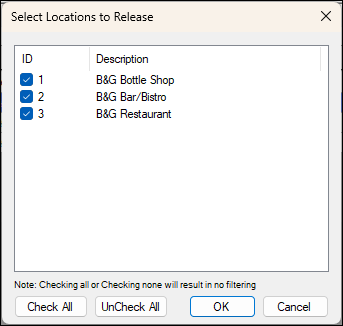
- The following prompt will be displayed:
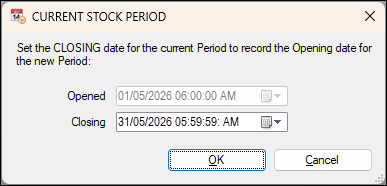
- Set the date/time that represents the CLOSING date/time for the current period MAY.
Notes ...
Do NOT set the Closing Date/Time in the future.
- Once set, it will determine the OPENING date/time for the next period JUNE.
- Select OK to record the Opening Stock for the period JUNE.
- Run the Period Location Summary (INV018) report to view the Opening Stock balances/levels for the period JUNE. These should be the same as the Closing Stock balances/levels reported, when the same report was run for the period MAY above.
End of article ▲