
Notes...
It is highly recommended to ensure backups are made of the swiftpos Touch Database and the Settings prior to any changes being made.
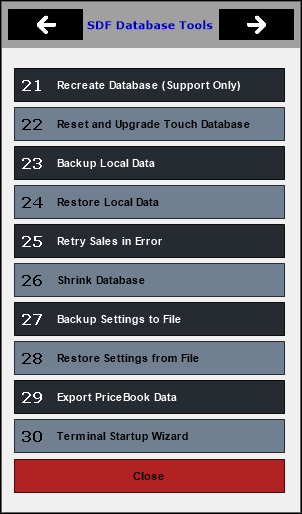
To access, refer HERE. Used to access tools relating to the Touch Database (SDF) in Touch.
- Recreate Database (Support Only) - Deletes the current Swiftpos Touch database and creates a new one as per a new installation. Please ensure that all sales have been sent to the Back Office before using this feature.
- Reset and Upgrade Touch Database - Resets the Swiftpos Touch database and then runs the database upgrade process. This feature should only be used when advised to do so by support staff.
- Backup Local Data - Creates a backup of all Swiftpos Touch database.
- Restore Local Data - Restores a backup of Swiftpos Touch database.
- Retry Sales in Error - Select to resend the Sales that are in error, to the Back Office. The number of sales in error is indicated by the number displayed in the square brackets [ ] beside the S indicator in the Touch information bar.
- Shrink Database - Select to shrink the database to decrease it's size. The database has a maximum size of 4GB so this option is not normally needed.
- Backup Settings to File - Creates a backup of theTouch settings to file.
- Restore Settings from File - Restores a backup of Touch settings.
- Export PriceBook Data - Use to export Product and Price related data that could be used to create a new Swiftpos Back Office database at another site. It does not include Keyboard layouts. This can be imported into a new site HERE. Refer HERE for more information.
- Terminal Startup Wizard - Select to invoke the Terminal Startup Wizard to configure the current Terminal for use. Refer HERE for more information. This option is useful when wanting to re-install a Touch Terminal that has been in storage for some period.
End of article ▲