
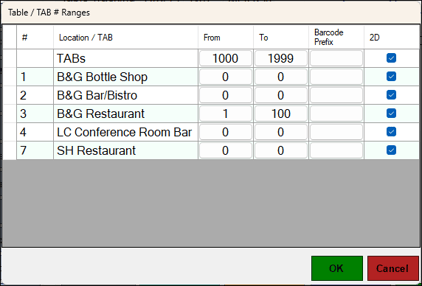
To access, select the Table Ranges option in Touch. Used to configure ranges of Table / TAB numbers in the different Locations in a Location Group (Venue).
Notes ...
If TABs are to be transferred from the Bar to the Restaurant (Table), then instead of using TABs, it is recommended that a Table # Range is created for the Bar. Then using the Table Transfer feature, these Bar Tables can be transferred to a Restaurant Table.
Alternatively, one or more Restaurant Tables can be linked to a TAB. This would ensure that the Table can be finalised to a TAB using the Finalise to TAB POS Key. The Table(s) will effectively be paid for when the linked TAB is eventually finalised.
- ID - Displays the Location number.
- Location / TAB - Displays the name of the Locations in the Location Group (Venue).
- From/To - Displays/Set the Table / TAB # Range for the selected Location/TABs. Table # Ranges CAN OVERLAP between Locations. A value of zero in both columns indicates no Tables are assigned to that Location. Even though there are no Tables assigned to a Location, any terminals in that Location can still access the Tables from other Locations (if they have Table / TAB # Ranges configured).
- Barcode Prefix - Select to open the Enter Barcode Prefix prompt to enter a Barcode Prefix. For example, Enter TAB for TAB related Barcodes and TBL for Table related Barcodes.
- 2D - Select the 2D option to ensure the Barcode is printed as a 2D Barcode rather than a 1D.
End of article ▲