
Subjects ▲ ▼
About ▲ ▼
When Is It Used? ▲ ▼
Used to access multiple print options relating to orders. Refer HERE for more information.
Screens ▲ ▼
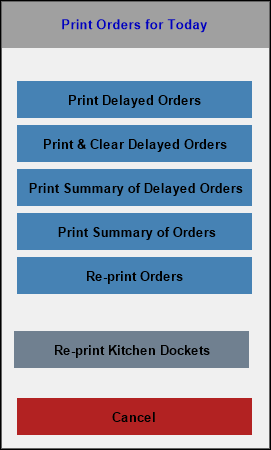
Print Orders Screen ▲ ▼
To access, select Print option in the Phone / Web Orders screen. Used to access multiple print options relating to orders.
- Print Delayed Orders - Select to print all delayed orders NOW regardless of their Delivery /Pickup Date-Time displayed in the grid. The Order will remain listed in the Phone / Web Orders screen
- Print & Clear Delayed Orders - Select to print the delayed orders.
- Print Summary Of Delayed Orders - Select to print a summary of all delayed orders.
- Print Summary Of Orders - Select to print a summary of all orders.
- Re-print Orders - Select to reprint all orders individually.
- Re-print Kitchen Dockets - Select to reprint kitchen dockets for all the orders currently displayed in the grid.
End of article ▲