
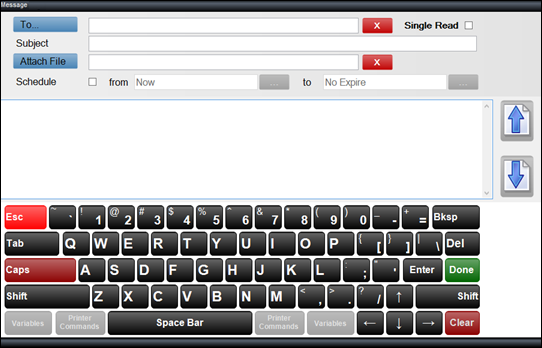
To access, select the Forward, New Message, Open or Reply option in the footer section of the Messages screen in Touch POS. Used to compose messages sent between Touch POS devices and/or Back Office.
-
To - Select from the drop-down list one of the following:
-
Clerk - Select to open the Clerks screen and select a Clerk/Staff Member.
-
Clerk Group - Select to open the Clerk Groups screen and select a Clerk Group.
-
Terminal - Select to open the Devices screen and select a Device.
-
Location - Select to open the Locations screen and select a Location.
-
- Single Read - To be continued ...
- Subject - Displays/Enter the summary of the message in the Subject field.
- Attach File - Displays/Select files to attach to the message.
- Schedule - Select to select the from/to dates on which the message will be sent.
End of article ▲