
This outlines How To Notify Kitchen Staff To Wrap Order/Sale in Touch using the Wrap (#350) POS Key.
When Is It Used? ▲ ▼
Used to ensure items/products in an order/sale are wrapped separately before serving. For example, a fish and chips takeaway order/sale. It enables the printing of multiple Kitchen dockets to be printed from one order/sale. This is achieved by using the Wrap (#350) POS Key to insert the text "-----WRAP-----" is inserted (int the sales grid) before the items/products that are needed to be wrapped separately, are added to the sales grid. All items/products before the inserted WRAP text will be printed on a separate Kitchen docket from those inserted after.
How To? ▲ ▼
In Touch:
- Add an item/product to an order/sale. For example, a Hamburger Steak.
- Select the Wrap (#350) POS Key.
- The text "-----WRAP-----" is inserted after the item/product in the sales grid.
- Add one or more items/products to the same order/sale. For example, Hamburger Bacon & Egg.
- Items/Products add after the WRAP text is inserted will be printed on a separate Kitchen docket to those add above the WRAP text.
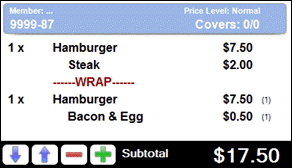
In this example, two Kitchen dockets will be generated. One for the item/product before the WRAP inserted text and one for the item/product after.
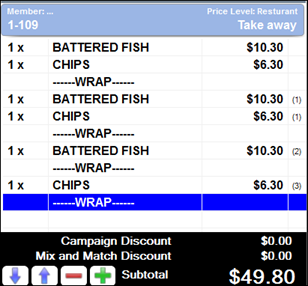
In this example, four Kitchen dockets will be generated.
End of article ▲