
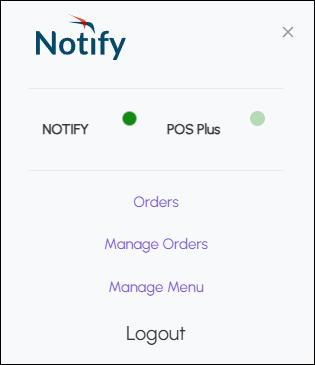
To access, this menu can be accessed from either the Orders or Manage Orders screens. Used to provide at a glance the status of Notify and access to Notify menu options.
Indicators ▼
- Notify - Indicates if Notify is available (green flashing dot).
- POS Plus - Indicates if POS Plus is available (green flashing dot).
Menu Options ▲ ▼
- Orders - Select to open the Orders screen to bump/manage Orders.
- Manage Orders - Select to open the Manage Orders screen to either enable/disable ordering or configure Wait Time Notifications. Refer HERE for more information.
- Manage Menus - Select to open the Manage Menus screen to enable/disable individual items/products that will immediately take effect in Orderaway.
- Logout - Select to logout of Notify.
End of article ▲