
This outlines How To Redirect Orders in Notify.
The concept of redirecting is to essentially provide Venues with the ability to ensure that all orders/sales submitted in one Location, using Notify, can be redirected to another Location. This may prove to be useful when there is a need to redirect to another Location as a result of diminished orders/sales traffic at the default Location.
Notes...
It is STRONGLY recommended to ONLY enable this option if there is absolute certainty regarding the implications of redirecting orders/sales to another Location.
To redirect orders/sales to another Location, do as follows:
- Login to Notify. Refer HERE for more information.
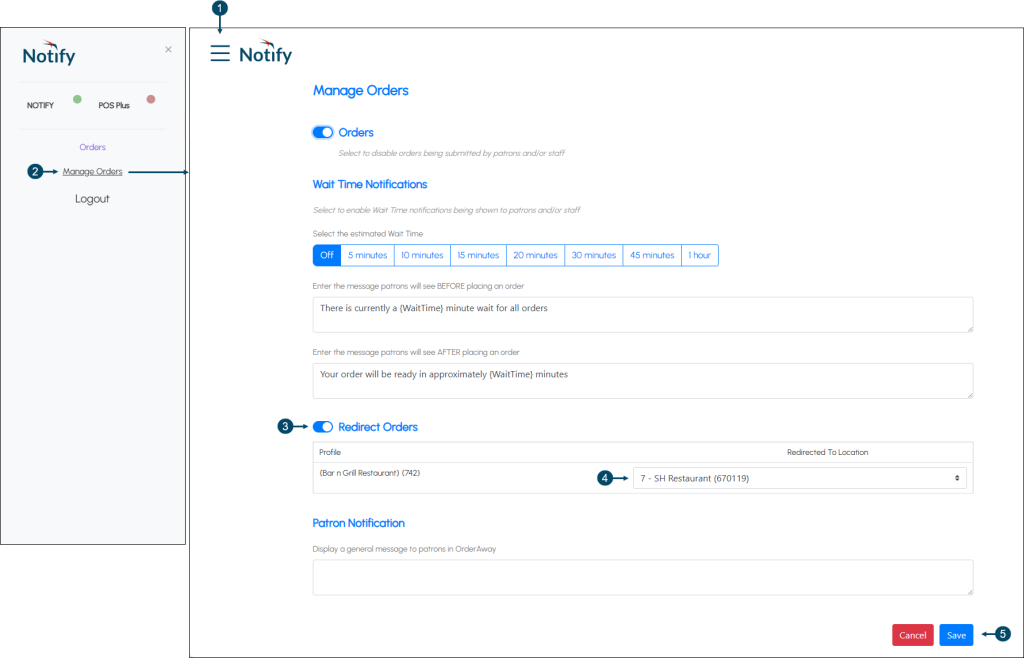
- Once logged in, select the Menu icon in the top left-hand corner of the Orders screen.
- Once selected, the Notify option will be displayed.
- Select the Manage Orders option to open the Manage Orders screen.
- Select the Redirect Orders option.
- Select the Location from the drop-down lists in the Redirected To Location column, to which orders/sales will be directed to.
- Select the Save option to save the changes.
End of article ▲