
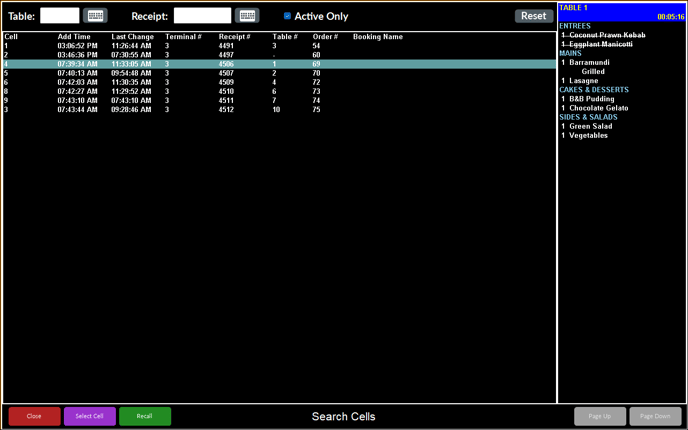
To access, refer HERE. Used to search for orders to recall or select.
Sections ▲ ▼
Header Section ▲ ▼

Provides filters to limit the number of orders listed in the grid. The filters available are Table, Receipt and Active Only. Select the Reset option to clear all filter selections.
Order Section ▲ ▼
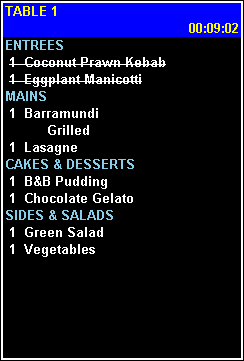
Lists the details and items of the order selected in the grid.
Grid Section ▲ ▼
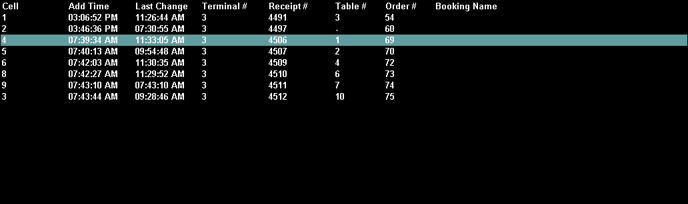
Lists the orders returned as a result of the filters selected in the header, along with their Cell number, Add Time, Last Change time, Terminal #, Receipt #, Table #, Order # and Booking Name.
Footer Section ▲ ▼

- Close - Select to exit.
- Select Cell - Select to ensure the order selected in the grid is selected and displayed when the KVS screen is displayed.
- Recall - Select to ensure the order selected in the grid is selected and displayed when the KVS screen is displayed.
- Page Up/Down -
End of article ▲