![Swiftpos_White.png]](https://help.swiftpos.com.au/hs-fs/hubfs/Swiftpos_White.png?height=40&name=Swiftpos_White.png)
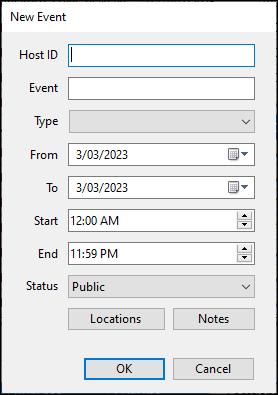
To access, select the New option and then the Event option from it's drop-down list in the Footer section of the Events Records menu option. Used to create a new Event.
- Host ID - Enter a unique ID.
- Event - Enter a description/name for the Event.
- Type - Select from the drop-down list, the type of Event. Refer HERE for more information.
- From/To - Enter/Select the From/To dates for the Event.
- Start/End - Enter/Select the Start/End times for the Event.
- Status - Select from the drop-down list the appropriate status.
- Locations - Select to open the Locations screen and select the Locations in which the Event will be held. At least one Location must be selected.
- Notes - Select to open the Notes screen to enter any Notes that maybe relevant to the Event.
End of article ▲