
This provides information regarding the EFT12 - Verifone (Vault) peripheral in Touch.
Subjects ▲ ▼
About ▲ ▼
What Is Required? ▲ ▼
- Swiftpos v10+
What Is Supported? ▲ ▼
- Surcharging
What To Consider? ▲ ▼
- Sites must have a current Software Enhancement Licence to use this feature.
- If a printer is connected, then ensure an actual printer is selected. Do NOT use the <<Default Printer>> option because the device cannot see it.
When Is It Used? ▲ ▼
When a Venue wants to make use of a Verifone provided EFTPOS device.
Screens ▲ ▼
EFTPOS Settings Screen ▲ ▼
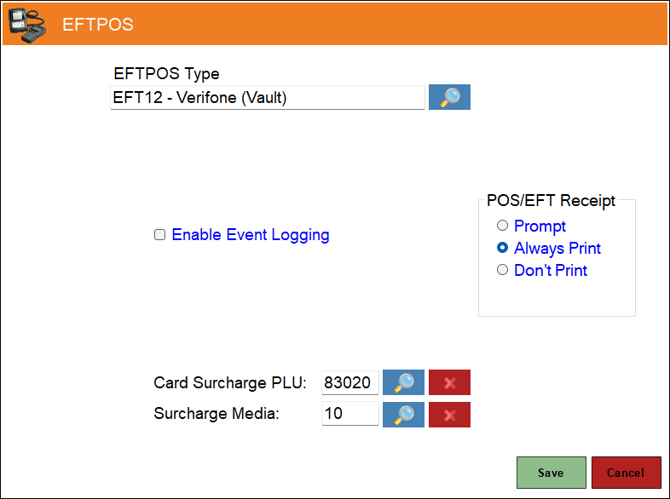
- EFTPOS Type - Select from the drop-down list the EFT12 - Verifone (Vault) option. Refer HERE for more information.
- POS/EFT Receipt - Select from one of the Print options available. Also, if a full receipt option is required, select the Full Receipt option. This option is used to control whether the customer's/cardholder's receipt generated by the PIN Pad needs to be printed at the end of the payment being taken.
- Prompt – Select to show the transaction result and prompt to confirm the printing of the customer's/cardholder's receipt.
- Always Print – Select to just print the customer's/cardholder's receipt automatically.
- Don’t Print – Select to never print the customer's/cardholder's receipt.
- Full Receipt - Select to the customer's/cardholder's full receipt.
Notes ...
The customer's/cardholder's copy is always added to the Touch Tax Invoice/Receipt for an order/sale. So if a Tax Invoice is being printed/re-printed at the end of an order/sale, it’ll include the customer's/cardholder's PIN Pad receipt within it.
- Enable Event Logging - Select to enable. It is recommended that this is enabled when testing or when troubleshooting an issue.
- Card Surcharge PLU - Displays/Select the PLU to be assigned to the returned surcharge amount.
Notes ...
Surcharges are configured through the device, payment provider or the acquiring bank as is appropriate. Also, when EFT Card Media Links are configured, a matching card prefix or card type can override the Card Surcharge PLU configured here.
- Surcharge Media - Display/Select the Media to be assigned to the returned surcharge amount.
Notes ...
When EFT Card Media Links are configured, a matching card prefix or card type can override the Surcharge Media configured here.
End of article ▲