
This outlines How To Log On as Administrator in Back Office.
How To? ▲ ▼
To ensure Swiftpos services continuously run (that is, also, when no one is logged onto the Swiftpos host server), it is recommended that all Swiftpos services are logged on as an Administrator. For the purpose of an explanation, the steps outlined below describe this process for the Connect service. To do this, do as follows:
- In Back Office navigate to the Services screen.
- Select the Windows Service Manager option from the Settings drop-down list in the footer section.
- The Windows Services screen will be displayed.
- Locate the Connect service (also known as the Swiftpos Touch Communication Service)
- Right select it and select the Properties option to it's properties screen.
- Select the Log On tab.
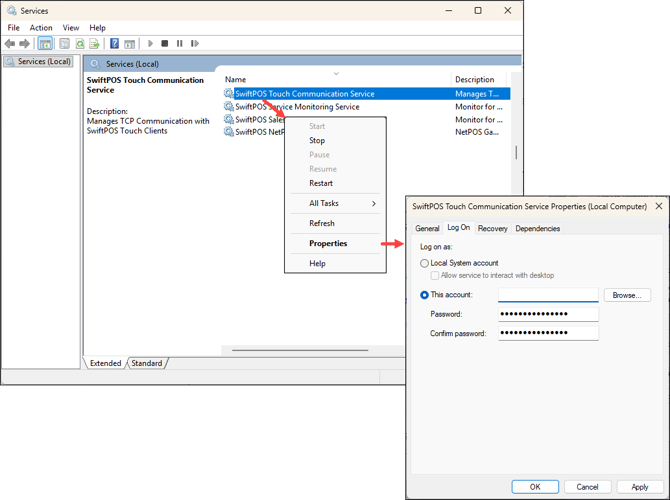
- Select the This account option and enter the administrator's login credentials
- Select Apply to apply the changes.
- Select OK to exit.
- The above steps can be followed for anyone of the other Swiftpos services.
End of article ▲