
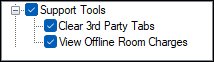
To access, expand the Support Tools option listed in the Clerk Security Items screen. Allows for the selection/deselection of the listed Touch POS Support Tools options to ensure authorisation is granted/withdrawn for the selected Clerk Security Group.
Support Tools ▲ ▼
-
Clear 3rd Party Tabs
Authorises the clearing/voiding of 3rd party open TABs. -
View Offline Room Charges
Authorises the viewing of room charges (Property Management System (PMS)) which have been attempted while a 3rd party PMS application is offline so these can be appropriately managed.
End of article ▲