
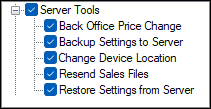
To access, expand the Server Tools option listed in the Clerk Security Items screen. Allows for the selection/deselection of the listed Touch POS Server Tools options to ensure authorisation is granted/withdrawn for the selected Clerk Security Group.
Server Tools ▲ ▼
-
Back Office Price Change
Authorises the changing of the pricing of items/products in the Back Office database from the Touch POS device (Only possible if a direct SQL connection is configured). Else, ability to temporarily change the pricing of Product Records locally at the Touch POS device if the applicable Function Key is added to the Keyboard design. -
Backup Settings to Server
Authorises the backup of the Touch POS device's settings. Device settings are backed up automatically when a auto-reboot is configured/triggered within the Touch POS device settings. -
Change Terminal Location
Authorises the changing of the Location a Touch POS device is assigned to. This will mean that, once a change of Location is affected, all sales and stock movements will be recorded under the new Location. Also, any Device Settings managed from Back Office for the new Location, will be sent to the Touch POS device as part of an update. -
Resend Sales Files
Authorises the re-sending of previously processed order/sales to Back Office again. Generally used in a support or disaster recovery situation. If Back Office detects it already has processed a re-sent order/sale, it will ignore it to ensure it is not duplicated. -
Restore Settings from Server
Authorises the restoring of the Touch POS device's settings. Useful when new hardware is replacing an old Touch POS device.
End of article ▲