
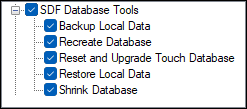
To access, expand the SDF Database Tools option listed in the Clerk Security Items screen. Allows for the selection/deselection of the listed Touch POS SDF Database Tools options to ensure authorisation is granted/withdrawn for the selected Clerk Security Group.
SDF Database Tools ▲ ▼
-
Backup Local Data
Authorises the backup of the Touch POS device's local database. -
Recreate Database
Authorises the recreation of the Touch POS device's local database. This will result in the loss of any unprocessed orders/sales that maybe cached/held in the local database. Suggest this is restricted to Support staff only. -
Reset and Upgrade Touch Database
Authorises the re-running of the Touch POS device's database reset & update procedures. This can be useful if it appears it has not been done successfully in the past. Suggest this is restricted to Support staff only. -
Restore Local Data
Authorises the restoring of the Touch POS device's local database. This will result in the loss of any unprocessed orders/sales that maybe cached/held in the local database. Suggest this is restricted to Support staff only. -
Shrink Database
Authorises access to shrinking the Touch POS device's local database. Suggest this is restricted to Support staff only.
End of article ▲