
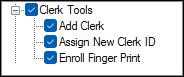
To access, expand the Clerk Tools option listed in the Clerk Security Items screen. Allows for the selection/deselection of the listed Touch POS Clerk Tools options to ensure authorisation is granted/withdrawn for the selected Clerk Security Group.
Clerk Tools ▲ ▼
-
Add Clerk
Authorises the adding of Clerks to the Back Office database from a Touch POS device. This is NOT recommended for Venues that have multiple Back Office databases. -
Assign New Clerk ID
Authorises the assigning/re-assigning of staff wristbands/cards from a Touch POS device. - Enroll Finger Print
Authorises the ability to enroll staff finger prints using a 3rd party supported device from a Touch POS device.
End of article ▲