
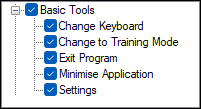
To access, expand the Basic Tools option listed in the Clerk Security Items screen. Allows for the selection/deselection of the listed Touch POS Basic Tools options to ensure authorisation is granted/withdrawn for the selected Clerk Security Group.
Basic Tools ▲ ▼
-
Change Keyboard
Authorises the changing of the Keyboard currently in use at a Touch POS device. -
Change to Training Mode
Authorises turning a Touch POS device on/off Training Mode. A device in Training Mode ensure not orders/sales are sent to the Back Office. Integrated EFTPOS sales or Voucher redemptions cannot be completed whilst a Touch POS device is in training mode. -
Exit Program
Authorises the exiting/closing of the Touch POS application. -
Minimise Application
Authorises the minimising of the Touch POS screen. This can be useful when a Touch POS device is being used for multiple purposes. For example, when also used for reception or administration purposes. -
Settings
Authorises access to the Device Settings option that provides access to configuring the Touch POS device.
End of article ▲