
About ▲ ▼
Allows access to the Members menu, which is used to manage Customer data and run processes based off the Customers captured. The terms "Customer", "Member" and "Account" are interchangeably used.
Allows access to search through Member/Account records which have been added to Swiftpos and are assigned to their Venue.
Notes ...
This only applies in those Venues for which authorisation has been granted.
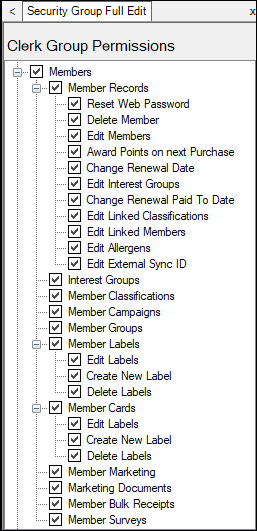
Clerk Group Permissions For Members ▲ ▼
-
Member Records
-
Reset Web Password - Allows access to reset the PIN number used by the Member to authenticate online.
-
Delete Member - Allows access to delete a Member/Account from Swiftpos.
-
Edit Members - Allows access to view/edit all attributes of a Member/Account Record in Full Edit mode.
-
Award Points on next Purchase - Allows access to set an amount of loyalty points the Member/Account should accrue when they next make a purchase at any Location.
-
Change Renewal Date - Allows access to change the Renewal/Financial To Date of Member/Account Records.
-
Edit Interest Groups - Allows access to add/remove Members/Accounts from Interest Groups (used for reporting purposes).
-
Change Renewal Paid To Date - Allows access to change when a Member/Account is next due to pay their Membership Fees.
-
Edit Linked Classifications - Allows access to add/remove Members/Accounts from Linked/Sub Classifications (used to group Members for reporting & promotional purposes).
-
Edit Linked Members - Allows access to add/remove Members/Accounts from other Member Records (used to link Members together for reporting purposes).
-
Edit Allergens - Allows access to edit allergens.
-
Edit External Sync ID - Allows access to edit external sync IDs.
-
- Interest Groups - Allows Interest Groups to be defined within Swiftpos so they can be applied to individual Members/Accounts for reporting purposes.
- Member Classifications - Allows Member/Account Classifications to be defined and managed within Swiftpos. They are used to group Members/Accounts for reporting, billing, accounts, reporting, price level & promotional purposes.
- Member Campaigns - Allows access to setup certain promotions which track the spend of Members/Accounts and rewarding them with a discount or voucher once they hit a trigger point.
- Member Groups - Allows Member Groups to be defined within Swiftpos so they can be applied to individual Members/Accounts for reporting purposes.
- Member Labels - Allows access to generate Labels for Members.
- Edit Labels - Allows access to edit the existing Member Label designs.
- Create New Label - Allows access to add new Member Label designs.
- Delete Labels - Allows access to delete Member Label designs.
- Member Cards - Allows access to generate Cards for Members.
- Edit Labels - Allows access to edit the existing Member Card designs.
- Create New Label - Allows access to add new Member Card designs.
- Delete Labels - Allows access to delete Member Card designs.
- Member Marketing - Allows access to build a list of Members/Accounts based on a variety of filters/imports and then issue them vouchers or export to a file for 3rd party systems. It can also be used for basic mailing, email or SMS (NON-HTML).
Notes ...
This only applies in those Venues for which authorisation has been granted.
- Member Documents - Allows access to build up NON-HTML document templates (Letters, Email or SMS) which can be used in conjunction with the Member Marketing module.
- Member Bulk Receipts - Allows access to complete a bulk-receipting process of Members/Accounts.
Notes ...
This only applies in those Venues for which authorisation has been granted.
- Member Surveys - Allows for Swiftpos to send a Survey to a Member/Account based on joining or making a purchase.
Notes ...
This only applies in those Venues for which authorisation has been granted.
End of article ▲