
IMPORTANT
Touchmini v1 has reached it's end of life and will NO LONGER be enhanced/improved. It is now superseded by Touchmini v2.
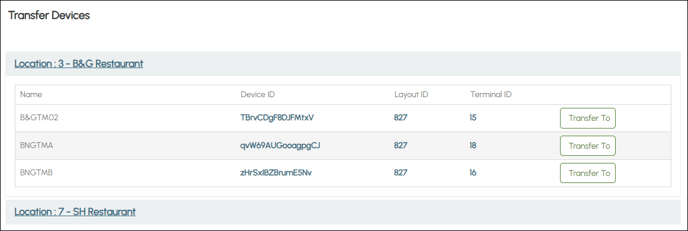
This is accessed by selecting the Transfer option from the TouchMini menu in Venue Manager. Refer to HERE for more information.
Subjects ▼
What Is It Used For? ▲ ▼
It is used to transfer TouchMini devices from one Location to another within a Venue.
Transfer ▲ ▼
Transfer Devices ▲ ▼
Initially lists the Locations currently activated for the Venue. Select a Location to expand and list the devices it has currently assigned to it. The following is listed for each device currently assigned to the selected Location:
- Name - Displays the name of the device.
- Device ID - Displays the device's unique ID.
- Layout ID - Displays the ID of the Keyboard Layout it has set as it's Home menu.
- Terminal ID - Displays the ID of the Terminal it is assigned to in Back Office.
- Transfer To - Select to open the Transfer Device prompt.
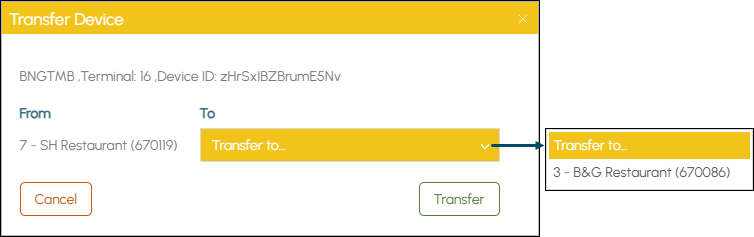
- From - Displays the Location the selected device is currently assigned to.
- To - Select from the drop down list the Location to which the selected device is to be transferred to.
- Transfer - Select to initiate the Transfer. Refer HERE for information on How To Transfer Devices Between Location.
End of article. ▲