
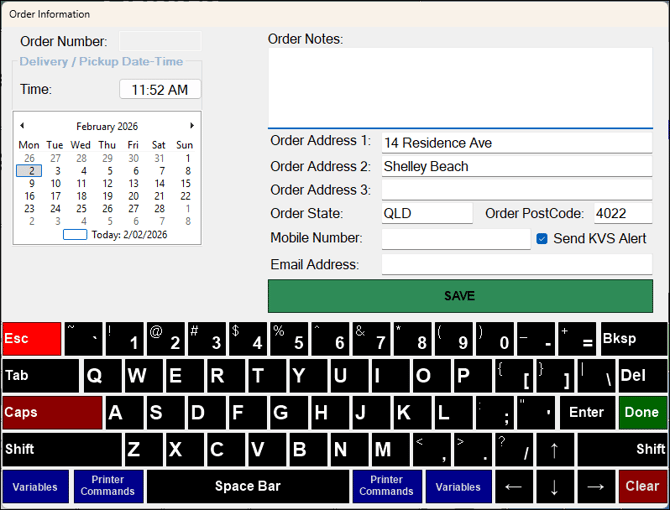
Accessed in Touch from various screens. Used to add/edit order information when taking an order in Touch.
-
Order Number - Displays the number of the order if an existing order is being edited.
- Delivery / Pickup Date-Time Section
- Time - Select the time displayed to open the Time Selection prompt to set a time for the delivery/pickup of the order.
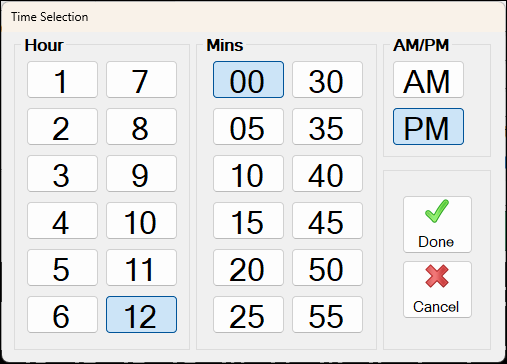
Time Selection prompt
-
Delivery Pickup Date-Time Section continued ...
- Calendar - Select a date on the Calendar to set the date for the delivery/pickup of the order.
- Order Notes - Enter any notes that maybe necessary to aid in the processing of the order.
- Order Address - Enter the address the order is to be delivered to.
- Mobile Number - Enter the contact number of the Customer/Member.
- Send KVS Alert - Select to ensure a Customer alert is sent when the order is bumped in KVS.
- Email Address - If provided enter the email address of the Customer/Member.
- Save - Select to save the changes.
- Keyboard section - Use to enter Notes, Address information, etc. Refer HERE for more information.
- Esc - Select to exit without saving.
End of article ▲