
This outlines How To Set An Available Servings Item/Product As Out Of Stock using the Available Servings (#53) POS Key in Touch.
How To? ▲ ▼
Used to notify Touch operators that the available Servings for a Products has run out. In Touch, do as follows:
- Select the Available Servings (#53) POS Key.
- Select period character (.) and hold for 3 seconds, then release. A '-' appears in the top right-hand corner of the sales grid.
- Select '0'.
- Select the item/product to which it is to be applied.
- Select the Available Servings (#53) POS Key again.
- The Product POS Key of the item/product selected above will display with a zero (0) character in the top right-hand corner. For example:
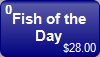
- Now when the above item/product is sold in Touch, a prompt will be displayed inforning the operator that there are no servings available.
End of article ▲