
This outlines the How To Review A TAB / Table using the Review Table (#148) POS Key in Touch.
How To? ▲ ▼
How To Review A TAB? ▲ ▼
- In Touch, select the TAB (#30) POS Key to display the Open TABs for All Clerks screen.
- Locate and select the TAB to be reviewed from the list of TABs displayed in the grid.
- Select the Review Table (#148) POS Key.
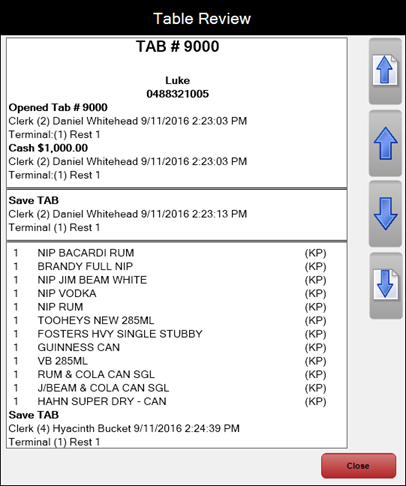
- The Table Review screen will be displayed with the all the activity listed for the selected TAB.
How To Review A Table? ▲ ▼
- In Touch, select the Table (#30) POS Key to display the Open Tables for All Clerks screen.
- Locate and select the Table to be reviewed from the list of Tables displayed in the grid.
- Select the Review Table (#148) POS Key.
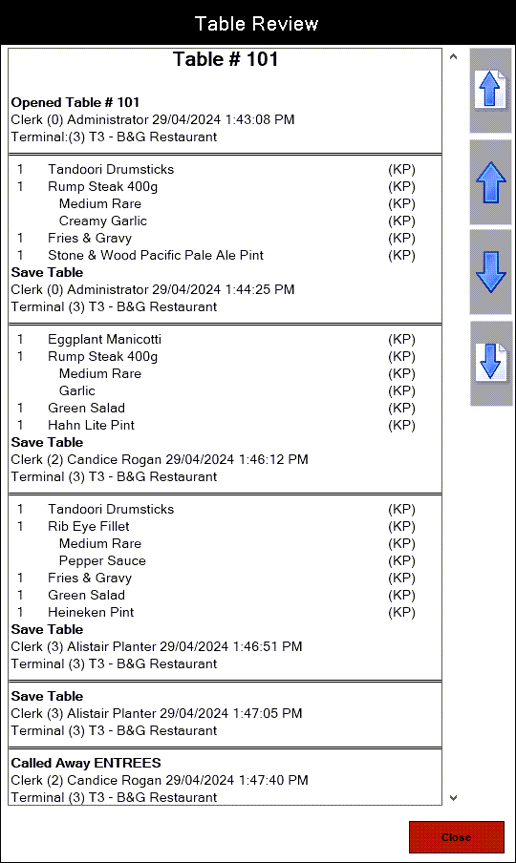
- The Table Review screen will be displayed with the all the activity listed for the selected Table.
End of article ▲