
This outlines How To Print A Suite Daily Report in Touch using the Suite Print Back (#955) POS Key.
Subjects ▼
What Is Required? ▲ ▼
This feature requires a connection to Back Office, given the data being reported is based on all Area (Suite) Order/Sales sent to Back Office for the current Trading Day, for the current Area (Suite).
Refer to What Is Required? for more information.
When Is It Used? ▲ ▼
Used to print out the Order/Sales for the current Area (Suite) in the form of a Area (Suite) Daily Report.
How To Print An Area (Suite) Daily Report? ▲ ▼
Do as follows:
- At the Area's (Suite's) Touch terminal, select the Suite Print Back (#955) POS Key.
- The Clerk Daily Report will be generated and print on the Touch terminal's associated Receipt printer.
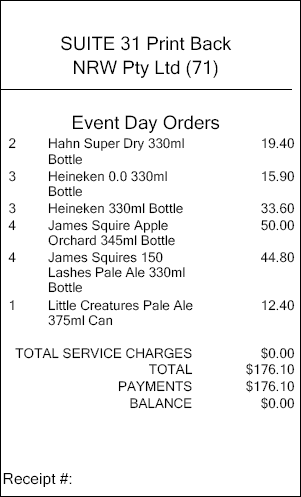
Sample of a Suit Print Back report
End of article. ▲