
This outlines How To Calculate Tender Change in Touchmini.
Subjects ▲ ▼
About ▲ ▼
What Is Required? ▲ ▼
- Swiftpos v10.74.8+
What To Consider? ▲ ▼
- Charging to an Account must cover the total value of the whole Order/Sale. Partially paying by charging to an Account and then paying the remaining amount using another payment Media is NOT supported.
When Is It Used? ▲ ▼
Used when Cash is accepted as tender for the payment of an Order/Sale, when using a Touchmini device and quickly determine the amount of change to be returned to the patron.
How To? ▲ ▼
Calculate Tender Change? ▲ ▼
Do as follows:
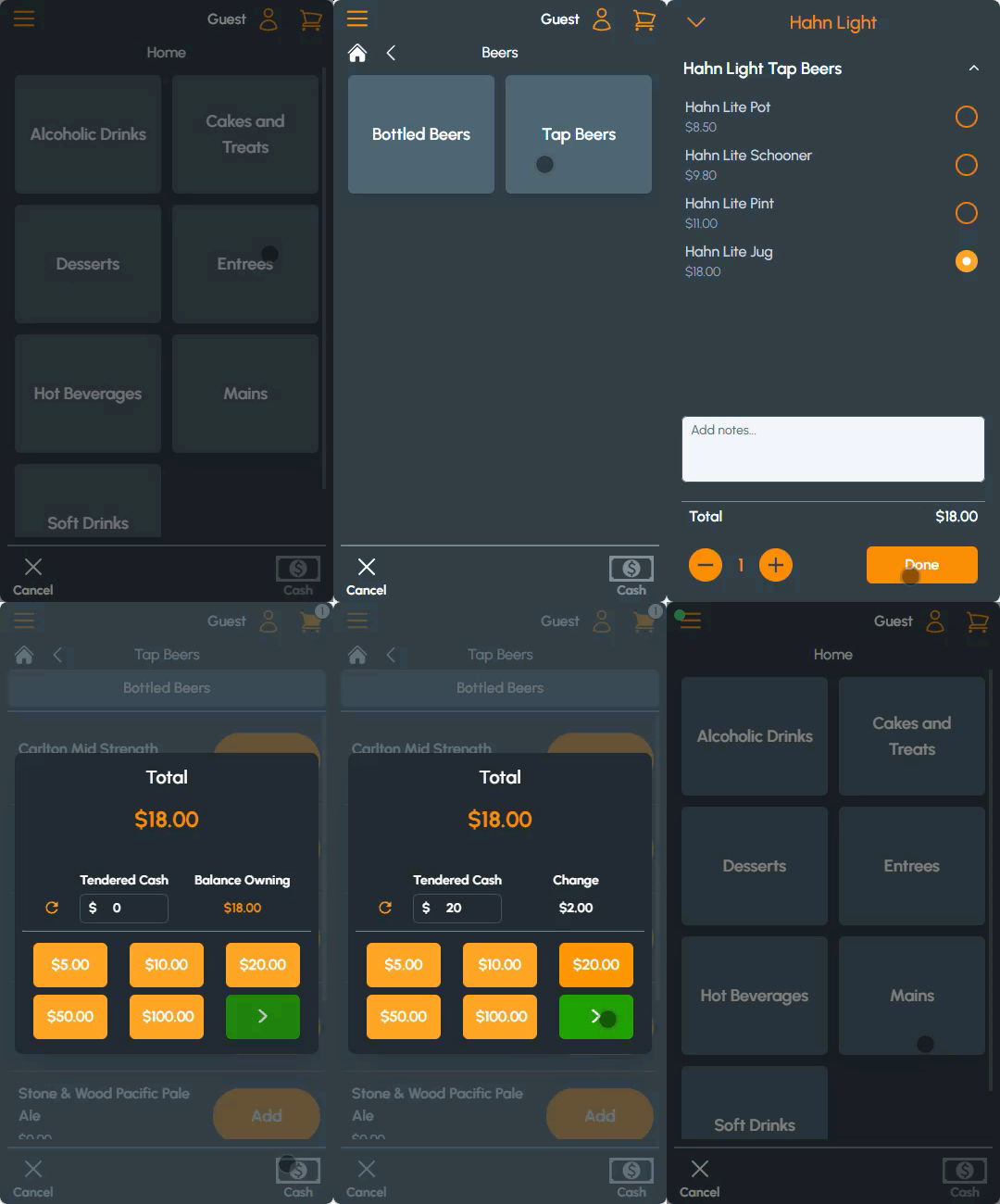
- Add items to an Order/Sale.
- Add items to an Order/Sale.
- Select the Cash button to finalise the Order/Sale.
- The Tendered Cash popup will automatically display.
- Select the Cash denominations tendered by the patron for payment.
- The amount of Change to be returned to the patron will then automatically be calculated.
How To Configure Touchmini? ▲ ▼
To enable this feature, do as follows:
- Ensure the Cash payment option is selected.
- Ensure the Tender Calculator for Change option is selected.
End of article ▲