
This outlines How To Configure And Use Card Payment Surcharges in Orderaway.
Subjects ▲ ▼
About ▲ ▼
What Is Not Supported? ▲ ▼
- The surcharge is applied to the total value of the order/sale and appended to the order/sale by assigning it to the PLU/product HERE. That is, it is applied after any discounts or Surcharges are applied to individual items/products, and after any Tips.
What Is Required? ▲ ▼
- Swiftpos v10.60-1+
What Is Supported? ▲ ▼
- The surcharge is calculated based on the total value of the order/sale. That is, it is applied after any discounts or surcharges are applied to individual items/products, and after any Tips.
When Is It Used? ▲ ▼
When a Venue has the requirement to pass on a card payment cost as a surcharge at the time a patron makes a payment.
How To? ▲ ▼
Configure Card Payment Surcharges? ▲ ▼
To configure Orderaway for Card Payment Surcharges, do as follows:
- In Swiftpos Back Office:
- Ensure a surcharge PLU/product has been configured. Refer HERE for more information
- In Orderaway:
- Locate and access Orderaway's Payment tab in the Configuration tabs. Refer HERE for more information.
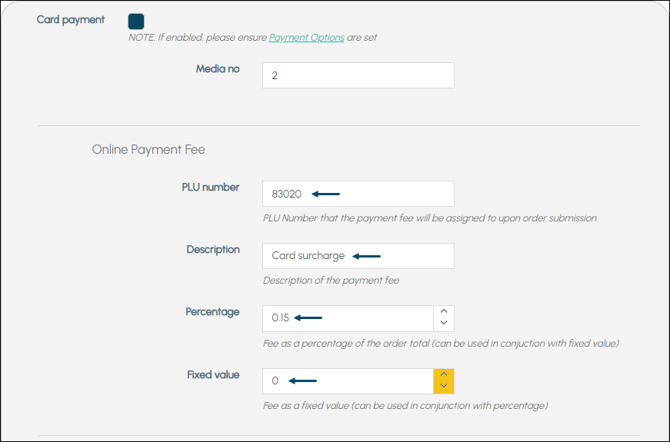
- Ensure the Card Payment option is enabled.
- Set the Media no (ID) to the appropriate Media that in Back Office. This will depend on the Venue's configurations and may require a new Media to be created in Back Office for Card Payment Type).
- If the Venue wants to pass on the Card Payment cost to patrons, then in the Online Payment Fee section, ensure:
- The surcharge PLU/product (as mentioned above) is entered in the PLU number field.
- Enter an appropriate description that patrons will see, for the surcharge, in the Description field.
- Enter values in the Percentage and/or Fixed value fields as is required.
Use Card Payment Surcharges? ▲ ▼
To be continued ...
End of article ▲