
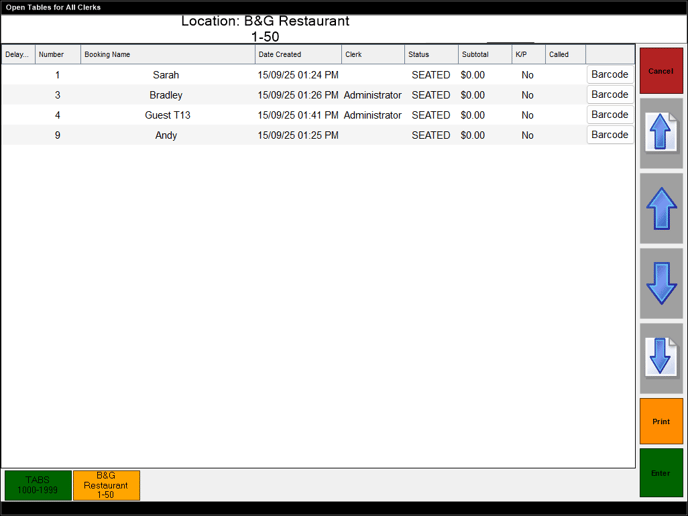
To access, select the Table (#30) POS Key. Used to view all Tables/TABs that are currently open in Touch.
Sections
Displays the Location and Table Range that is currently configured for the Touch terminal.
Lists the Tables/TABs that are currently open, along with their Table/TAB Number, Booking Name, Date Created, Clerk, Status, Subtotal, Kitchen Print Yes/No, Called status and Barcode.
- Cancel - Select to exit the screen.
- Up/Down Arrows - Select to navigate up/down the Tables listed in the grid.
- Print - Select to print.
- Enter - Select to exit the screen and open the selected Table in the sales grid.
- TABS - Select to ensure the grid displays the TABS that are currently open.
- Location (B&G Restaurant) - Select to ensure the grid displays the Tables that are currently open in the Location.
End of article ▲