![Swiftpos_White.png]](https://help.swiftpos.com.au/hs-fs/hubfs/Swiftpos_White.png?height=40&name=Swiftpos_White.png)
This outlines How To View Vii Gift Card Transactions using the View Transactions 3rd Party Gift Card (#243) POS Key in Touch.
Subjects ▼
How To View Vii Gift Card Transactions? ▲ ▼
Do as follows:
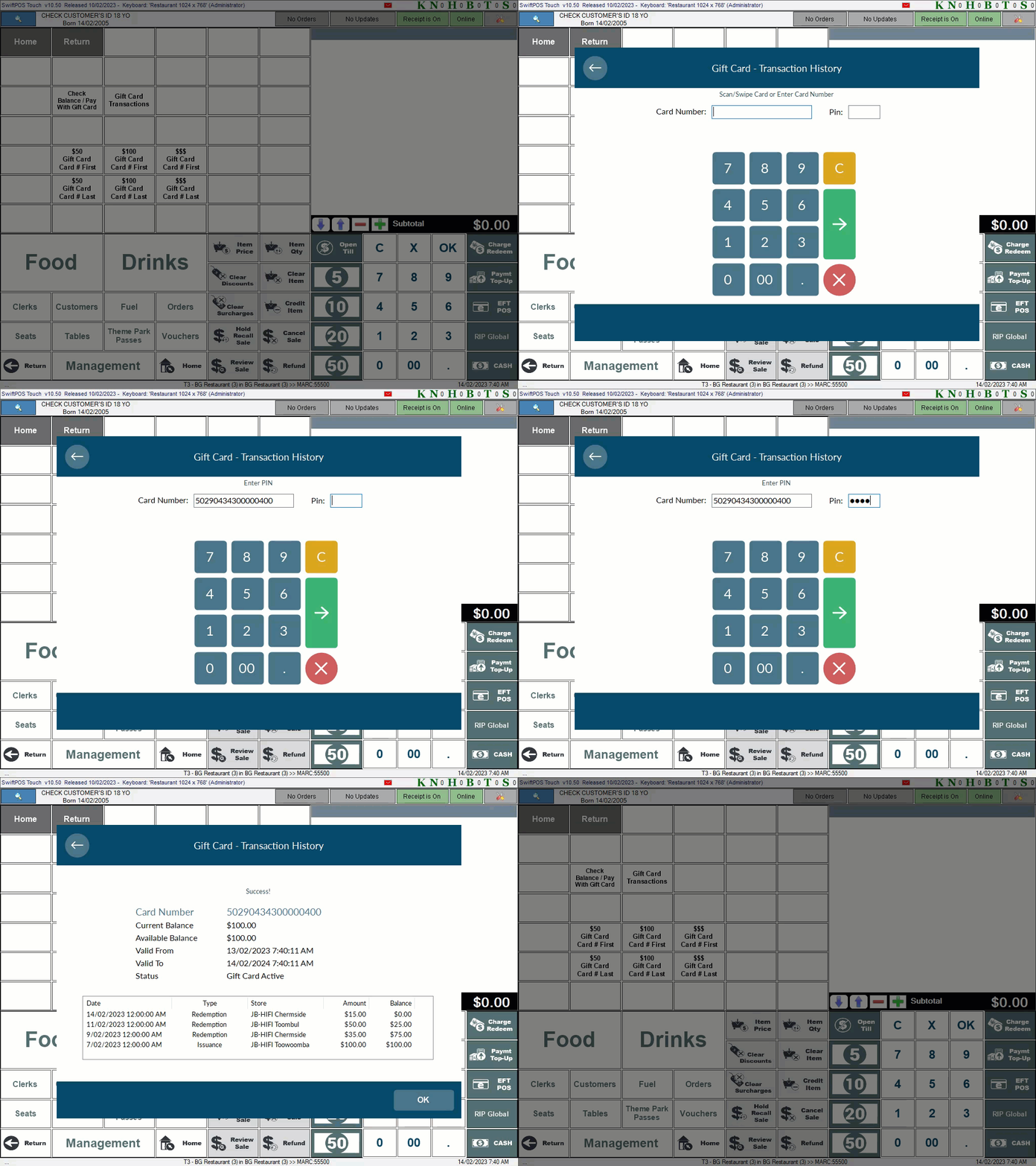
- Select the View Gift Card Transactions (View Transactions 3rd Party Gift Card (#243)) POS Key in Touch.
- When the Gift Card - Transaction History screen is displayed, scan/swipe or enter the Gift Card Number and the PIN.
- The Gift Card's Transactions should be displayed.
- Toggle select any one of the column headings to sort the order of the Transactions in the grid.
What Is Required? ▲ ▼
- Ensure the View Transactions 3rd Party Gift Card (#243) POS Key is added to the appropriate Keyboard Layout via the Designer and the More Settings button:
- Ensure it is given an appropriate Caption. For example, View Gift Card Transactions.
- Ensure it is has the appropriate Interface selected.
End of article. ▲