
This outlines the How To Pay Using Doshii using the Doshii PIP (#166) POS Key. Refer HERE for more information.
How To? ▲ ▼
How To Pay Using Doshii? ▲ ▼
- In Touch, add Items/Products to a sale.
- Select the Doshii PIP (#166) POS Key. Once selected, the following prompt will be displayed:
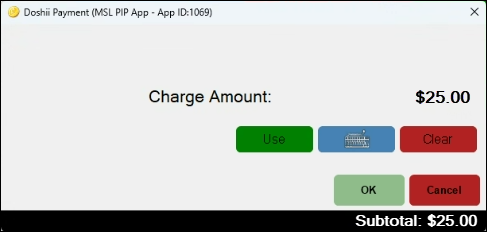
- Select the Use option to pay using the whole Subtotal Amount displayed. Otherwise, select the Keyboard option to enter a preferred amount. Used when a partial payment is required.
- Select OK to submit the payment.
- If a partial payment was entered finalise the remaining balance using an alternative Media. For example, Cash, EFTPOS, etc.
End of article ▲