
This outlines the How To Configure And Select A Language for Orderaway.
How To? ▲ ▼
Configure Venue Manager For Language Selection? ▲ ▼
In Venue Manager (refer HERE for more information), ensure:
- The Venue's Cloud Client ID is selected.
- In the System menu:
- Select the Venue Setup menu option:
- Ensure the Language tab is selected.
- Ensure the Default Language is set for the Venue.
- Ensure the appropriate Languages are selected from the Available Languages options listed. These are the languages a patron will be able to select in Orderaway.
- Save the changes.
- Ensure the Language tab is selected.
- Select the Venue Setup menu option:
Select A Language In Orderaway? ▲ ▼
In Orderaway do as follows:
- Select the menu icon in the top left of any menu to expand the Orderaway menu.
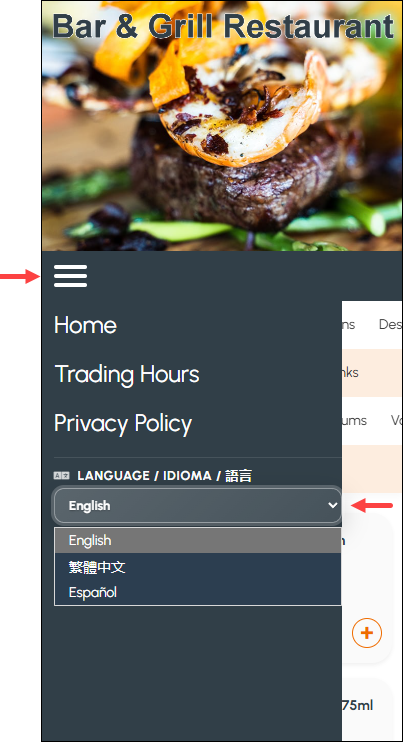
- Select the down arrow opposite the currently selected language to expand it and see the available languages.
- Select the appropriate Language.
End of article ▲