
This provides information regarding the EFT08 - Tyro Payments peripheral in Touch.
Refer HERE for Reseller & Support information
Subjects ▲ ▼
About ▲ ▼
What Is Required? ▲ ▼
- Swiftpos v10+
What Is Supported? ▲ ▼
- Surcharging
- Tipping
What To Consider? ▲ ▼
- Sites must have a current Software Enhancement Licence to use this feature.
- If a printer is connected, then ensure an actual printer is selected. Do NOT use the <<Default Printer>> option because the device cannot see it.
When Is It Used? ▲ ▼
When a Venue wants to make use of a Tyro provided EFTPOS device.
Screens ▲ ▼
EFTPOS Settings Screen ▲ ▼
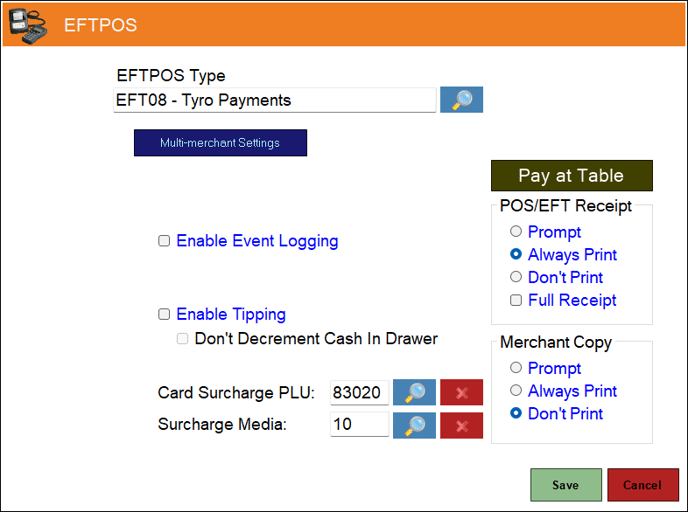
- EFTPOS Type - Select from the drop-down list the EFT08 - Tyro Payments option. Refer HERE for more information.
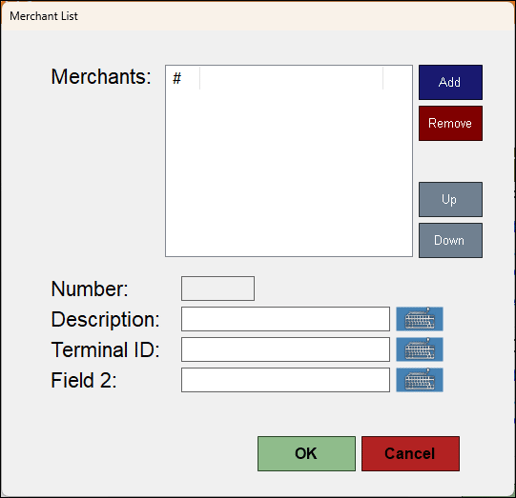
- Multi-merchant Settings - Select to open the Merchant List screen to manage merchants
- Enable Event Logging - Select to enable. It is recommended that this is enabled when testing or when troubleshooting an issue.
- Enable Tipping - Select to enable.
- Don't Decrement Cash In Drawer - Select to ensure that Cash received as a Tip is held in a Tip jar or some other Tip vessel and is NOT added to the Cash Drawer. If unselected, it is assumed that the Cash received as a Tip is added to the Cash Drawer until distribution at a later date. Refer HERE for more information.
- Card Surcharge PLU - Displays/Select the PLU to be assigned to the Surcharge.
- Surcharge Media - Display/Select the Media to be assigned to the Surcharge.
- Pay at Table - Select to open the EFTPOS Pay at Table Settings screen.
Notes ...
This option is not visible from a Touch Lite POS terminal.
- POS/EFT Receipt - Select from one of the Print options available. Also, if a full receipt option is required, select the Full Receipt option.
- Merchant Copy - Select from one of the Print options available.
Merchant List Screen ▲ ▼
End of article ▲