
-
Installers / Links / Releases
-
API
-
Back Office
-
Cloud Back Office
-
Events
-
Events Portal
-
How To
-
KVS
-
Member Portal
-
Notify
-
Oolio Pay
-
Orderaway
-
POS Keys
-
Self-Service Kiosk
-
Self-Service POS
-
Swiftpos
-
Touch
-
Touchmini
-
Troubleshooting
-
Venue Hub
-
Venue Manager
-
3rd Party Integrations
- Account Management
- Business Intelligence
- Cash Management
- eCommerce
- Exports / Imports
- Front Office Systems
- Fuel Systems
- Gaming
- General Ledger
- Gift Cards / Promotions / Vouchers
- Membership / Loyalty
- Middleware Applications
- Payment Integrators
- Product Level Blocking
- Reservations
- Swiftpos
- Tab Management
- Time & Attendance
- Value Added Services
-
Uncategorized
- API
- Back Office Accounts
- Back Office Administration
- Back Office - Clerks
- Back Office - Data Export
- Back Office - Inventory
- Back Office - Members
- Back Office - Menus
- Back Office - Products
- Back Office - Services
- Back Office - Suppliers
- Back Office - Swiftpos
- Back Office - Terminal Sales
- Back Office - Touch Settings
- Back Office - Vouchers / Discounts
- How To
- KVS
- OrderAway
- Venue Manager
- 3rd Party Integrations
- Touch
- Cloud Back Office
-
Touchmini v1 (End Of Life)
What Is It
KVS - About
What Is It? ▲ ▼
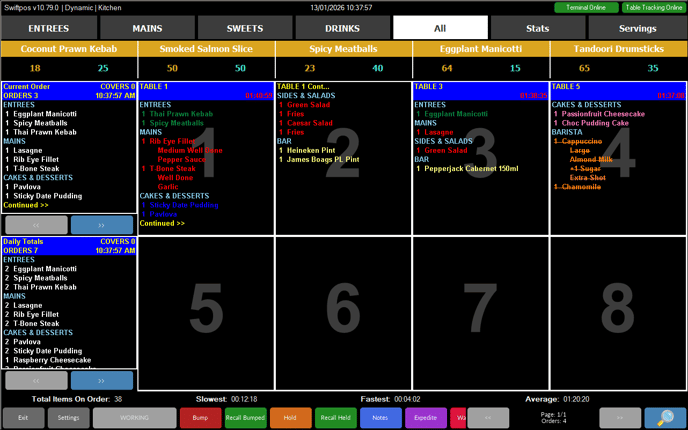
KVS (Kitchen Video System) offers Venue's a perfect solution to compliment and/or replace their Kitchen/Order printers. Ideal for fast paced restaurants, casual dining or quick service restaurants. It allows Order information to be displayed in Kitchens on one or more screens and at the same time allows for individual Orders to be bumped, recalled and expedited as required.
- The option of using a touch screen or bump box to bump off Orders.
- Customisation the KVS screen to best suit the needs and requirements of the Venue.
- The option to print labels for Items/Products bumped.
- The option to set and display wait times (in 5 minute intervals) on the KVS and Touch screens.
- Bump Items/Products from one screen to the next.
- Reporting of serving times.
Refer HERE for an explanation of the KVS screen.
End of article ▲