
This outlines How To Backup The Table Tracking Database in Touch.
How To? ▲ ▼
- Select the Backup Table Tracking Data option from the Table Tracking Tools menu in Touch to open the Back Up Database screen to backup the Table Tracking database.
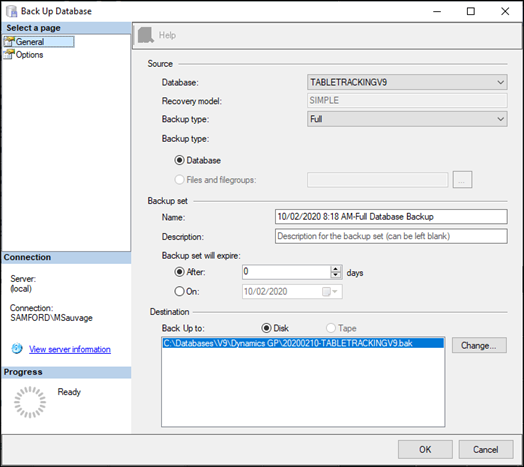
- In the Select a page section, select the General option.
- Select the Table Tracking database from the Database drop-down list in the Source section.
- Select the Full option in the Backup type drop-down list.
- Ensure the Database option is selected.
- Ensure the Destination parameters are correct.
- Select OK to invoke the backup.
- A confirmation notification will be displayed.
End of article ▲