
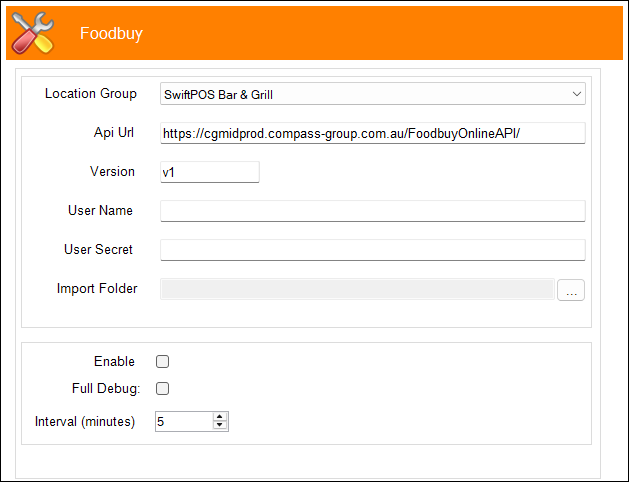
This outlines the information and the steps that are needed to familiarise oneself with the FoodBuy interface in Service Monitor.
Refer HERE for more information.
Subjects ▲ ▼
About ▲ ▼
What Is Required? ▲ ▼
- Swiftpos v10+
- Ensure the site is registered for Advanced eTrade.
What To Consider? ▲ ▼
- This feature is currently designed to support version v1 of the FoodbuyOnlineAPI.
When Is It Used? ▲ ▼
Used to configure Foodbuy settings to facilitate the Importing/Syncing of Foodbuy Catalogue Items and Suppliers as well as the Downloading/Importing of Supplier Invoices.
Foodbuy offer sites procurement services by partnering with Suppliers and providing access to a national food and hospitality procurement and supply chain capability. In support of those Swiftpos sites that have embraced the services of Foodbuy, Swiftpos integrates with Foodbuy, via Foodbuy's Online API, to facilitate the importing of Foodbuy Supplier Invoices. The integration comprises of the following:
- Supplier & Product Import/Sync - This is used to download/sync Foodbuy Suppliers & Catalogue Items and import/update in Swiftpos. This is a one-way integration, that is Supplier & Catalogue Item data is ONLY created/updated in Swiftpos. It's primary role is to facilitate the importing of Foodbuy Supplier Invoices.
- Invoice Import - Used to download Foodbuy Suppliers Invoices and import into Swiftpos. Refer HERE mor more information.
How To? ▲ ▼
Screens ▲ ▼
FoodBuy Service Monitor Settings Screen ▲ ▼
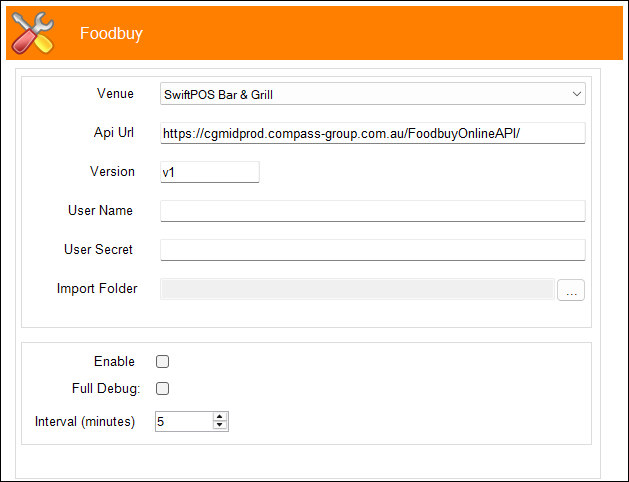
To access, refer HERE. Used to configure the settings required for the FoodBuy interface. Once configured the interface will regularly (at the Interval set) poll Foodbuy's portal to check for updates to Foodbuy Supplier and Catalogue item/product data and then import/sync these into Swiftpos.
Notes ...
The first time the Service Monitor is started after configuring for Foodbuy Integration, it will retrieve the Foodbuy Catalogue and populate the Swiftpos SupplierProductCatalogueTable with the Foodbuy Catalogue items/products.
Be aware that the first time Catalogue items/products are retrieved and processed (initial load), it may exceed 20 minutes.
- Venue - Select from the drop-down list the Venue for which the settings are being configured.
- Api URL - Displays/Enter the Foodbuy Online API URL as provided.
- Version - Displays/Enter the version of the API as provided that is currently supported.
- User Name - Display/Enter the username as provided.
- User Secret - Display/Enter the User Secret as provided.
- Import Folder - Displays/Select the folder into which Foodbuy Invoices will be imported.
- Enable - Select to ensure the Foodbuy feature is enabled. If not selected the Foodbuy interface will not execute.
- Full Debug - Select to enable. This should only be enabled when recommended.
- Interval (minutes) - Set to time (in minutes) that is required to lapse before the Foodbuy Portal is polled for updates to Supplier and Catalogue item/product data. Ideally this would be set to occur once or a couple of times per day.
End of article ▲