
This outlines How To Create A Guest / Non-Member Order Member For Cloud Applications.
Subjects ▲ ▼
About ▲ ▼
What Is Required? ▲ ▼
- Ensure the Guest/Non-Member Orders Classification has been created.
When Is It Used? ▲ ▼
A Guest/Non-Member Order is an Order that is placed via Orderaway and/or Touchmini when there is no requirement for a Swiftpos Member/Account to be associated with the Order. A Guest/Non-Member Order may also be placed by 3rd party applications that wish to submit Orders through to Swiftpos, but have no associated Swiftpos Member/Account.
Swiftpos requires any Orders to have a Member/Account assigned to them. So, when Orders need to be placed for Guests or Non-Members, a Guest/Non-Member Order Member needs to be created in order for it to be used as the default Member/Account assigned to each Order.
How To? ▲ ▼
How To Create A Guest / Non-Member Order Member For Cloud Applications? ▲ ▼
Do as follows:
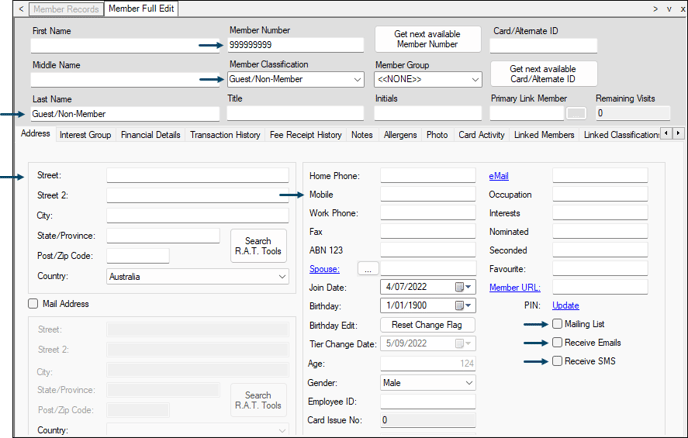
- Using the Swiftpos Back Office's Member Records, create a Member with the number 999999999.
Notes ...
If this number is already in use, then locate the next lowest number and use it instead. For example, 999999998.
- Leave the First Name field blank.
- Set the value of the Last Name field to Guest/Non-Member Order.
- Set the value of the Member Classification field to the Classification created HERE
- It is recommended to enter defaults for the following, in support of Delivery type service:
- Delivery address in the address fields.
- Contact number in the mobile field.
- Ensure the Mailing List, Receive Emails and Receive SMS options are NOT selected.
- Save the changes.
End of article ▲