
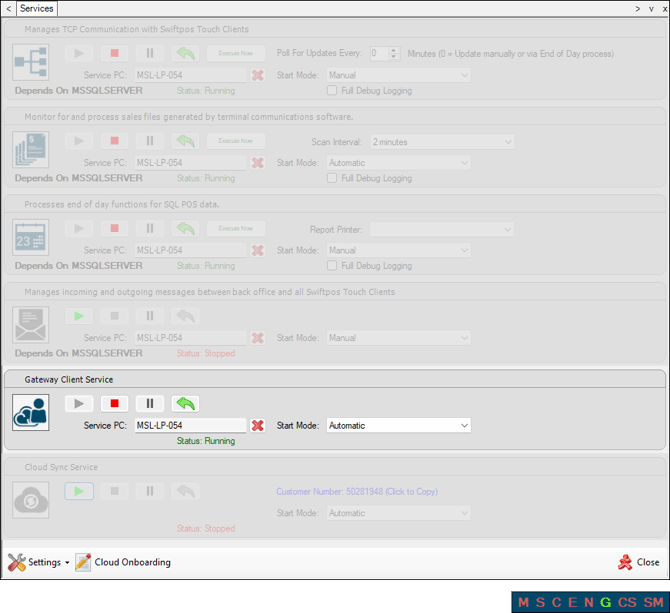
This provides information regarding the Swiftpos Gateway Client service (Touch.Gateway.Client.exe).
Subjects ▲ ▼
About ▲ ▼
What Is It? ▲ ▼
The Gateway Client service is responsible for communication between Swiftpos Back Office and the Swiftpos Cloud infrastructure. It will be an outbound secure amqp internet connection to the Swiftpos Cloud infrastructure.
What To Consider? ▲ ▼
- It is recommended that the Gateway Client service's Start Mode option is set to Automatic.
- The Gateway Client service is automatically started when a Swiftpos Location is activated.
- This service will automatically be stopped/started when a Swiftpos Location is Activated and will also be added as a POS Interface in Touch, if it does not already exist for the Device that is configured HERE
When Is It Used? ▲ ▼
It is required when a Venue's Swiftpos Back Office needs to communicate with Swiftpos Cloud applications like Orderaway, Touchmini, etc.
How To? ▲ ▼
Troubleshooting ▲ ▼
Confirm An Issue Is Resolved? ▲ ▼
To confirm the issue is resolved:
- Check the URLs field in the POS API Interface settings screen has entries listed.
- Activate the Location.
- Confirm the Gateway Client Service (Touch.Gateway.Client.exe) and the POS API Interface (POS.Gateway.Client.exe) have been launched and are running. Refer to the Task Manager screenshot in the Confirm Resolution section for more information.
Gateway Client Service Not Starting Successfully ▲ ▼
Cause
This issue may arise as a result of one of the following:
- The designated Orders Touch POS device for the selected Location has not had the Touch (Swiftpos.Touch.exe) application started at least once in the past with the right click Run as Administrator option selected.
- The POS API Interface (POS.Gateway.Client.exe) has not had the Port open for All users button selected to ensure a URI reservation is added in Windows to allow Touch to be able to bind to the POS API configured Port.
Action To Be Taken
- Launch Touch with the right click Run as Administrator option selected. Refer to How To Run Touch As Administrator for more information. Once Touch is started as Administrator, at least once, the User Access Control - Do You Want To Allow This App To Make Changes To Your Device? prompt will NO longer be displayed on an ongoing basis when started again as a standard user.
- Check the URLs field in the POS API Interface settings screen has entries listed. This will indicate that the Port open for All users button has been selected in the past. If NOT (that is, no entries are listed in the URLs field), then refer to How To Configure the POS API Interface for more information.
End of article ▲