
About ▲ ▼
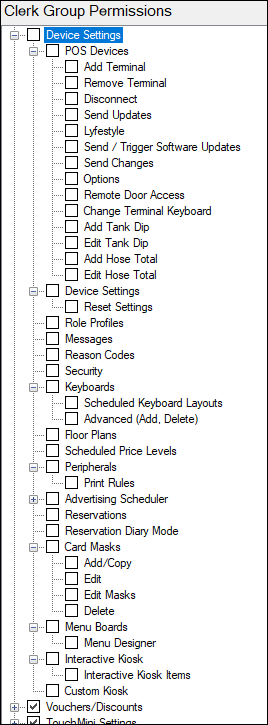
Allows access to the Device Settings menu, which is used to configure and manage access to operational features related to POS Devices and associated devices within SwiftPOS.
-
These permissions determine what actions a Clerk (via their Security Group) can perform in relation to:
- Device management
- Device configuration and updates
- Messaging and system controls
- Keyboard layouts and UI behaviour
- Venue-specific features (e.g. kiosks, reservations, advertising)
The Device Settings permissions provide granular control over:
- POS Device lifecycle (add/remove/update)
- Device and communication management
- User interface behaviour (keyboards/layouts)
- Operational features across Venues
Proper configuration ensures:
- Secure device access
- Controlled updates and changes
- Consistent user experience across all devices
Clerk Group Permissions For Device Settings ▲ ▼
-
POS Devices - Allows access to view all the devices and their status. Applies only to authorised Venues.
-
Add Terminal
Allows adding a new POS Device record so it can connect to the server. -
Remove Terminal
Allows removal of a POS Device record, preventing it from connecting. -
Disconnect
Forces a POS Device to disconnect from the server. -
Send Updates
Pushes a full update, rebuilding all device cached data. - Lyfestyle
Access restricted to Reception Kiosk functionality. - Send / Trigger Software Updates
Pushes software updates to devices after server updates. - Send Changes
Sends partial updates (only recent changes from Back Office). - Options
Grants access to settings impacting the Connect Service. - Remote Door Access
Enables kiosk-based door unlocking functionality. -
Add Tank Dip
Fuel industry–specific process. -
Edit Tank Drop
Fuel industry–specific process. -
Add Hose Total
Fuel industry–specific process. -
Edit Hose Total
Fuel industry–specific process.
-
- Device Settings
Manages which settings are sent to devices per location/outlet. Applies only to authorised Venues.- Reset Settings - Allows authorised Clerks/Staff to reset all configured settings at a selected hierarchy level.
-
Role Profiles
Legacy/Not Used -
Messages
Access to SwiftPOS Messaging Service for internal communication between employees, devices, and locations. Applies only to authorised Venues. - Reason Codes
Define reason codes for actions like refunds, wastage, or no sales. Applies only to authorised Venues. - Security
Configure which functions Clerks/Staff can access outside keyboard design (e.g. exit POS, credit limits). -
Keyboards
View/edit keyboard designs used across POS, OrderAway, and Waiter devices. Applies only to authorised Venues.-
Scheduled Keyboard Layouts
Schedule keyboards/layouts to change at specific times/dates. -
Advanced (Add, Delete)
Allows advanced keyboard functions such as creating or deleting designs/layouts.
-
- Floor Plans
Manage floor plans for Table Service (requires Table Tracking). - Scheduled Price Levels
Schedule automatic price level changes by time/date. Applies only to authorised Venues. - Peripherals
Allows access to define Print Peripheral rules which can be applied to POS Devices so the behaviour of when sales need to print kitchen/dispense dockets or management of Receipts/Tax Invoice details are managed from Back Office. Applies only to authorised Venues.
- FlashMediaCreator
Legacy/Not Used
- SwiftPOS Advertising
Allows access to access the image-based Advertising module to add/edit/delete Advertising schedules which are
sent to POS Terminals. Applies only to authorised Venues.
- SwiftPOS Advertising
- FlashMediaCreator
- Advertising Scheduler
Manage schedules for advertising content across devices and menu boards. -
Reservations
Add/edit/delete reservations. -
Reservations Diary Mode
Access reservations in diary view mode. -
Menu Boards
Manage menu board schedules. Applies only to authorised Venues. -
Menu Designer
Create and edit menu board designs. -
Interactive Kiosk
Access kiosk-based ordering features.-
Interactive Kiosk Items
Configure kiosk item availability.
-
-
Custom Kiosk
Custom kiosk configuration options.
End of article ▲